
HijriDate Plugin
What is Today
Today’s date in the Hijri calendar, in Arabic or English, right on the Pocket PC’s home screen.
- Latest
- 1.5, March 2005
- First
- 1.0, June 2003
- Price then
- $2.99
- Today
- Free
- Runs on
- Pocket PC 2002, Windows Mobile 2003 and 5
The story
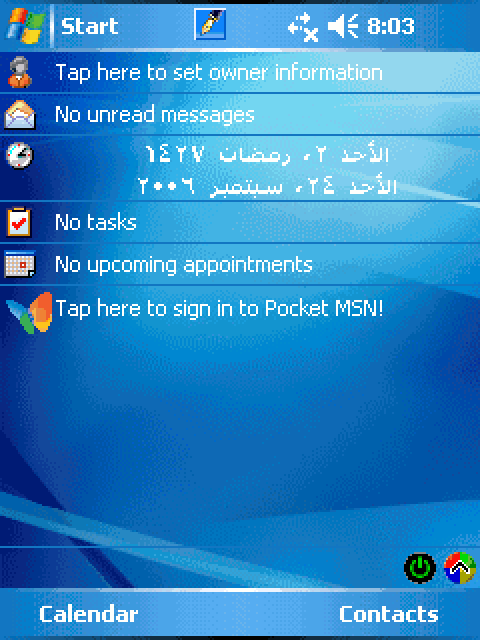
The Hijri calendar follows the moon. It sets the dates of Ramadan and the two Eids for Muslims everywhere. HijriDate put it on the Pocket PC’s Today screen, its home screen, in Arabic or English, beside the usual date or instead of it. It was the first light-weight Today plug-in for the Hijri calendar.
It drew its Arabic by itself, with no extra fonts or programs, and calculated the date for Mecca. You could move it a day earlier or later to match the crescent sighting where you live. A tap switched between the two calendars.
Every version
From DinarSoft’s revision history and installers. Press Run to play through them, or step one at a time.
-
HijriDate 1.0 June 27, 2003
- The first release.
-
HijriDate 1.1 March 10, 2004
- A stronger date engine.
-
HijriDate 1.2 April 20, 2004
- Windows Mobile 2003 support.
-
HijriDate 1.5 March 5, 2005
- Windows Mobile 5 support.
Arabic on the home screen
In 1991 Yasser’s ARABART taught a DOS PC to write Arabic. In 2003 he did it again on a phone, with Hosam Aly. HijriDate put today’s Hijri date, in Arabic, on the Pocket PC’s home screen, right under the owner’s name and the unread mail.
The Hijri calendar follows the moon, and it sets the dates of Ramadan, the two Eids and the Hajj. A Pocket PC knew only the Gregorian calendar, and an English one had no Arabic font at all. HijriDate brought both. It is a Today plug-in, the 2003 version of a home screen widget, and it cost $2.99.
This is HijriDate rebuilt from its own file: its word pictures, its four settings pages, its icons and its calendar engine. Tap the clock icon to open the settings. Change the format, move the date a day, switch to English, or try another theme.
 8:03
8:03

Sunday 2 Ramadan 1427, with the adjustment at +1.
The moon decides
A Hijri month starts when the new crescent is first seen after sunset. HijriDate works that out from the moon itself, for any date, in about a dozen lines of arithmetic.
Pick a date. The steps below the answer are HijriDate’s, in its order. Count the days and estimate which new moon came last. Work out the exact moment it was born, and decide when it could first be seen. Then count months from a fixed starting point. Every number is the one its code computes. The engine on this page is a line-for-line copy of HijriDate’s, and it matches the original, running in an ARM emulator, on all 37,700 dates from 1700 to 2300.
1 Ramadan 1427
- Count the days. 24 September 2006 at midnight, London time, is Julian day
2,454,002.5: days since 4713 BC, the number astronomers use so dates subtract cleanly. - Estimate the new moon. 106.7 years since 1900, times 12.3685 new moons a year, gives new moon number
1320. - Find its birth. New moon 1320 is born on 22 September 2006 at 14:43 in Mecca. That is after 6:00 in the morning, so day 1 of the month is 24 September 2006.
- Name the month. New moon 1048 opened Muharram 1405. 1320 is 272 months later: 22 years and 8 months. Year 1427, month 9: Ramadan.
- Count the day. 24 September is the first full day of that month: 1 Ramadan 1427.
| Calendar | Date |
|---|---|
| HijriDate 1.5, its engine | 1 Ramadan 1427 |
Your browser ships four Islamic calendars, and they do not always agree with each other. One follows Saudi Arabia’s official tables, one estimates from the sky, and two use plain arithmetic. Muslims in different countries can start Ramadan a day apart for the same reason: the crescent is seen in one place before another. That is why HijriDate has an adjustment of up to two days either way. The date on the phone then matches the sighting announced where you live.
The new-moon formula, in HijriDate’s order
The moment of a new moon is a steady beat of 29.53 days, plus 13 small corrections for the pull of the sun and the tilt and stretch of the moon’s orbit, minus a few seconds for the Earth’s slowing spin. Its code runs them in this order, with these numbers:
jd = 2415020.75933 + 29.53058868 * k // the steady beat sa = 359.2242 + 29.10535608 * k // where the sun is ma = 306.0253 + 385.81691806 * k // where the moon is tf = 2 * (21.2964 + 390.67050646 * k) // its height above the Earth’s path x = (0.1734 - 0.000393 * t) * sin(sa) // the biggest correction x -= 0.4068 * sin(ma) // and 11 more like it x -= (0.41 + 1.2053 * t + 0.4992 * t * t) / 1440 // the Earth’s spin return jd + x Six in the morning, Mecca time
One rule turns the moment of the new moon into the first day of the month, and it fits in one short routine.
A crescent needs time to grow wide enough to see. A new moon born before 6:00 in the morning in Mecca is old enough to be seen at sunset that same day. The month then starts the next morning. Born any later, it is seen one evening later. Step through its routine with the new moon of September 2006, then drag the birth time yourself.
- 1036A8
bl tmoonphase; new moon n: when? - 1036BC
str r4,[r6]; keep it for later - 1036F8
mov pc,fp; __subd: drop whole days - 103738
mov pc,fp; __led: ≤ 0.5? - 103740
beq 103788; no: find the hour - 103764
mov pc,fp; __addd: + 1 day - 1037B4
mov pc,fp; __subd: − 0.5 - 1037D0
mov pc,fp; __muld: × 24 - 1037EC
mov pc,fp; __addd: + 3 hours - 103828
mov pc,fp; __gtd: after 6:00? - 103850
movne pc,fp; __addd: + 1 day - 103854
pop {r4,r5,r6,fp,pc}; return the start
-
double visible(int n, double *nm) { -
double jd = tmoonphase(n, 0);// UT -
*nm = jd; -
float f = jd - (int)jd;// 0 = noon -
if (f <= 0.5) -
return jd + 1; -
float h = (f - 0.5) * 24 + 3; -
if (h > 6)// too young -
return jd + 1; -
return jd;// seen -
}
And 24 September 2006 is day 1 of Ramadan 1427. Drag the birth time to try any moment.
Every fraction here, the 0.5, the 24 and the 6, goes through the system’s software floating point, one call per add. Today, crescent calculators weigh the moon’s age, its height and its distance from the sun at every city. HijriDate packed the idea into one comparison against the holiest city, so the whole calendar fits beside a clock on a 2003 phone.
Forty-four words, drawn by hand
Arabic letters change shape with their neighbors, and in 2003 a Pocket PC could not join them. HijriDate never needs to. It carries every word it will ever show as a picture. There are 7 days, 12 Hijri months, 12 Gregorian months, 10 digits, a comma, a dash and a space.
Each is 16 pixels tall and one bit a pixel, ink or paper. Tap one to see its pixels.
Days
Hijri months
Gregorian months
Digits and marks
To write a date, HijriDate lists the words in reading order, then joins their pictures into one strip. Arabic reads right to left, but its numbers read left to right, so the digits of each number go into the list last first. Step through it:
- 104FFC
ldr r3,[r0,#4]!; count the words - 105014
bl operator new; a slot per word - 105038
ldrh r1,[r7,#-4]!; next ID, from the end - 105050
bl LoadImageW; load its picture - 105070
bl sub_104E5C; Paste: join them - 105088
bl DeleteObject; free the pieces - 104EC4
bl GetObjectW; Paste: measure each - 104ED4
add sl,r3,sl; add up the widths - 104F10
bl CreateBitmap; one blank strip - 104F4C
bl SelectObject; pick up a word - 104F80
bl BitBlt; copy it in at x - 104F90
add sb,r3,sb; x += its width - 104FD0
pop {r4-fp,pc}; return the strip
-
HBITMAP MakeStrip(DWORD *ids) { -
for (n = 0; ids[n]; n++) ; -
pic = new HBITMAP[n + 1]; -
for (k = 0; k < n; k++)// last first -
pic[k] = LoadImage(hInst, -
ids[n - 1 - k], ...); -
pic[n] = 0; -
strip = Paste(pic); -
for (k = 0; k < n; k++) -
DeleteObject(pic[k]); -
return strip; -
} -
HBITMAP Paste(HBITMAP *pic) { -
for (n = w = 0; pic[n]; n++) { -
GetObject(pic[n], 24, &bm[n]); -
w += bm[n].bmWidth; -
} -
strip = CreateBitmap(w, 16, 1, 1, 0); -
for (k = x = 0; k < n; k++) { -
SelectObject(from, pic[k]); -
BitBlt(to, x, 0, bm[k].bmWidth, 16, -
from, 0, 0, SRCCOPY); -
x += bm[k].bmWidth; -
} -
return strip; -
}
One picture holds the whole date, ready to draw in any color.
Eight formats come out of the same 44 pictures, from الأحد ٢، رمضان ١٤٢٧ to ٠٢-٠٩-٢٧. Today your phone shapes Arabic from a font on the fly. A website that ships its icons as one sprite sheet, or a game that draws its score from digit pictures, is doing what HijriDate did.
Any wallpaper, any color
Owners picked their own Today themes: blue waves, photos, black. The word pictures are plain black on white. Yet on the phone they show in the theme’s own text color, with the wallpaper showing through every gap.
It does it with BitBlt, the Windows call that copies pixels, and three of its raster operations: XOR, AND and OR. Two run once to color a copy of the word. Two run every time it is drawn. Pick a color and a wallpaper, then step through the code.
- 105180
cmp r3,sl; same color as before? - 105190
beq 105378; yes: copy is ready - 10520C
bl CreateBitmap; a color picture - 10527C
bl CreateSolidBrush; ink-color brush - 105298
bl FillRect; all ink color - 1052BC
bl FillRect; another, all white - 1052F8
bl BitBlt; SRCINVERT: XOR - 10532C
bl BitBlt; SRCAND: AND - 1053A0
bl GetTextColor; the theme’s color - 1053AC
bl sub_105160; make the copy - 105460
bl BitBlt; SRCAND: screen AND - 1054AC
bl BitBlt; SRCPAINT: screen OR
-
BOOL Colorize(Word *w, COLORREF ink) { -
if (ink == w->ink && !w->dirty) -
return TRUE;// ready -
w->color = CreateBitmap(cx,cy,1,24,0); -
tmp = CreateBitmap(cx, cy, 1, 24, 0); -
b = CreateSolidBrush(ink); -
FillRect(w->color, &r, b); -
b = CreateSolidBrush(0xFFFFFF);// white -
FillRect(tmp, &r, b); -
BitBlt(tmp, 0, 0, cx, cy, -
w->word, 0, 0, SRCINVERT); -
BitBlt(w->color, 0, 0, cx, cy, -
tmp, 0, 0, SRCAND); -
w->ink = ink; -
return TRUE; -
} -
void Draw(Word *w, HDC dc, int x, int y) { -
Colorize(w, GetTextColor(dc)); -
BitBlt(dc, x, y, cx, cy, -
w->word, 0, 0, SRCAND); -
BitBlt(dc, x, y, cx, cy, -
w->color, 0, 0, SRCPAINT); -
}
The next time, with the same color, it skips straight to the two screen steps.
| 2003 to 2005 | 2026 | Why it is the same idea |
|---|---|---|
SRCAND with the word, then SRCPAINT with a colored copy | CSS mask-image over a background-color | One picture says where, another says what color. |
GetTextColor on the Today screen | currentColor in an SVG icon | The icon takes the color of the text around it. |
| A colored copy kept until the color changes | A memoized render | Do the work once, reuse it until the input changes. |
One small file
All of HijriDate is one file, HijriPlugin.dll: 95,232 bytes. The Today screen loads it, gives it a strip of the screen, and calls it.
A DLL is a library other programs load. The Today screen asks this one for two functions by number: 240 draws the item, 241 runs its settings. The installer uses the very same file for its own setup steps. Tap a part of the file to see what is in it.
HijriPlugin.dll, version 1.5 · 95,232 bytes
Header 1,024 bytes, 1%
Tells Windows Mobile this is an ARM library and where each part starts.
Code 32,768 bytes, 34%
Every routine: the moon, the calendar, the strip of words, the coloring, the settings pages and the key check. About 8,000 ARM instructions.
Word pictures 6,528 bytes, 7%
The 44 Arabic words and digits. Every Arabic date HijriDate can show is built from these.
Logos 33,428 bytes, 35%
Two DinarSoft logos for the About page: DiNAR and the Arabic دينار, each with a globe. These are the logos DinarSoft used before November 2006, kept only here.
Icons 4,728 bytes, 5%
The small clock beside the date, and the icons for the settings and the installer.
Settings pages 3,368 bytes, 4%
Seven dialog layouts: Main, Hijri, Gregorian, About, License Key and two more. The rebuilt settings above are drawn from these.
Version and index 4,172 bytes, 4%
The version block, 1.5, and the index that finds each picture and page by number.
Data 5,632 bytes, 6%
The English month names, the app’s Babylonian month names, the tables of word numbers and month lengths, and the settings in memory.
Tables for Windows 3,584 bytes, 4%
The list of functions it offers: 240 and 241 for the Today screen, Install_Init and Install_Exit for the installer. Then a table that lets Windows walk back through calls, and the fix-ups for loading at any address.
A widget on a phone today asks the system to wake it on a schedule. The Today screen of 2003 asked every plug-in, every two seconds, whether it needed to redraw. HijriDate answers no, again and again, until the day changes. Drag the device clock across midnight:
- Redraw? No
- Redraw? No
- Redraw? No
- Redraw? No
- Redraw? No
- Redraw? Yes: the date changed
- Redraw? No
- Redraw? No
- Redraw? No
- Redraw? No
- Redraw? No
| 2003 to 2005 | 2026 | Why it is the same idea |
|---|---|---|
| A Today plug-in: a DLL with functions 240 and 241 | A WidgetKit widget on iPhone, an App Widget on Android | A small view the home screen hosts and refreshes. |
WM_TODAYCUSTOM_QUERYREFRESHCACHE every two seconds | A widget timeline that names its next update | Redraw only when the content changes. |
Settings under Software\Microsoft\today\items\Hijri Date | UserDefaults or SharedPreferences | A small key-value store per app. |
One broadcast after install, WM_WININICHANGE | A widget reload call | Tell the home screen to look again, no restart. |
That last row is a quiet kindness. HijriDate’s installer ends by sending the Today screen one broadcast message, so the date appears at once, with no restart.
The redraw check, in ARM
bl GetLocalTime ; what day is it now? cmp r2,r3 ; the same day as the one drawn? cmp r2,r3 ; the same month? cmp r2,r3 ; the same year? cmp r3,#0 ; settings changed? mov r0,#1 ; yes: redraw pop {r4,pc} ; otherwise 0: nothing to do A key for each Pocket PC
HijriDate ran free for 15 days. To keep it, you bought a key for the Pocket PC Code shown on its License Key page. That key worked on that Pocket PC alone.
The code comes from the device ID, a number unique to each Pocket PC, folded into 16 letters and digits. The key is made from the code by a shuffle in the style of RC4. 120 numbers are mixed by a secret word, then walked to turn each character of the code into a letter. The letter O never appears, so nobody confuses it with a zero. Step through it, or type any code to see its key.
Key: EQZC - SAYT - YAJE - LERW
- 1056F0
bl wcslen; length of the code - 105738
strh r3,[r1]; S[i] = i - 105774
strh r3,[r1]; K: the word, repeated - 1057A4
add r1,r3,r1; j += S[i] + K[i] - 1057B4
mov pc,r3; __rt_udiv: mod 120 - 1057CC
strh r7,[r0]; swap S[i], S[j] - 1057ECnext:
add r1,r7,#1; i += 1 - 10581C
add r1,r8,r5; j += S[i] - 105840
strh r5,[r0]; swap them - 10584C
add r1,r3,r2,lsr #16; t = S[i] + S[j] - 105874
eor r1,r2,r3; char XOR S[t] - 105884
mov pc,r3; __rt_udiv: mod 25 - 105890
add r0,r3,#0x41; + 'A' - 1058A0
cmp r3,#0x4f; skip 'O' - 1058B8
bhi next; next character
-
void Key(WCHAR *code, WCHAR *word) { -
WORD S[120], K[120]; n = wcslen(code); -
for (i = 0; i < 120; i++) S[i] = i; -
for (i = 0; i < 120; i++) -
K[i] = word[i % wcslen(word)]; -
for (i = j = 0; i < 120; i++) { -
j = (j + S[i] + K[i]) % 120; -
swap(&S[i], &S[j]); -
} -
for (i = j = 0; n--; code++) { -
i = (i + 1) % 120; -
j = (j + S[i]) % 120; -
swap(&S[i], &S[j]); -
t = (S[i] + S[j]) % 120; -
c = 'A' + (*code ^ S[t]) % 25; -
*code = c >= 'O' ? c + 1 : c; -
} -
}
All 16: EQZC - SAYT - YAJE - LERW. On that one Pocket PC, this key unlocks HijriDate.
To check a key, HijriDate runs the same function on its own code and compares the two. The key is stored in the registry, so it survives a restart. Run in an ARM emulator, HijriDate’s own check routine accepted the key for each of 200 Pocket PCs and turned away all 1,000 near misses.
The 15 days are counted from a tiny file the installer writes, \Windows\inter.dat. It holds the install date twice, in two disguises, nudges every second byte by one, and ends with a checksum. Change any byte and see what HijriDate makes of it:
Installed 24 September 2006, so on 27 September the trial has 12 days left.
In 2026, Yasser Awad released HijriDate as freeware. The unlock section above makes the key for your Pocket PC from its code, with the same function you just stepped through.
Download
Here are all 2 installers the Internet Archive kept, as DinarSoft published them. Take the one marked latest: the .CAB installs straight on the device, the .exe installs from a Windows PC.
| File | Version | Size | SHA-256 |
|---|---|---|---|
| DinarSoftHijriDate15.CABInstall on the Pocket PC · latestRecovered from the Internet Archive (Wayback Machine, January 16, 2007) | 1.5 | 186.4 KB | 5c0e955b80c01e6f4f76d80ae700ecbb39b63f77aff24b26adaabc128243202e |
| DinarSoftHijriDate15.exeRun on a Windows PC with ActiveSync · latestRecovered from the Internet Archive (Wayback Machine, December 24, 2006) | 1.5 | 344 KB | 91611e8cd8faba5d1dcbf5aabf340b989137ec5bc8f29031fa49026c757d0e82 |
Pick an installer you downloaded. Your browser computes its SHA-256 fingerprint on your own device, nothing is uploaded, and looks for it among all 24 DinarSoft files. A match means every byte is the one the Internet Archive kept.
Unlock the full version
Every DinarSoft trial asked for an unlock key after 15 days. In 2026 Yasser Awad made HijriDate free, so here is the key, made the way DinarSoft made it.
Each Pocket PC gets its own key. On the Today screen, tap the clock icon beside the date, open About and tap Register…. Copy the Pocket PC Code into the box here. Then type the key, four groups of four letters, into the four boxes.
For HijriDate 1.5.
Install it
- On a Pocket PC or Windows Mobile phone. Download the .CAB file marked latest. Copy it to the device on a memory card, through ActiveSync, or download it in Pocket Internet Explorer. Then open File Explorer on the device and tap it. It installs itself, like tapping an .apk on Android.
- From a Windows PC. Connect the device through ActiveSync on Windows XP, or Windows Mobile Device Center on later Windows, and run the Setup .exe. It sends the app to the device.
- In an emulator. Microsoft’s Device Emulator runs Windows Mobile 5 and 6 on a Windows PC. In its File menu, choose Configure and set a shared folder. The device sees that folder as its Storage Card. Put the .CAB there and tap it in File Explorer.
- Unlock it. Open HijriDate, find its Register screen, and type the key from this page.