
HandyLauncher
The Seamless Launcher
Your own start menu in the corner of the screen, and every shortcut opens in the screen direction you chose for it.
- Latest
- 3.4, March 2006
- First
- 1.0, August 2003
- Price then
- $5.49
- Today
- Free
- Runs on
- Pocket PC 2002, Windows Mobile 2003 and 5. Portrait, landscape and square screens
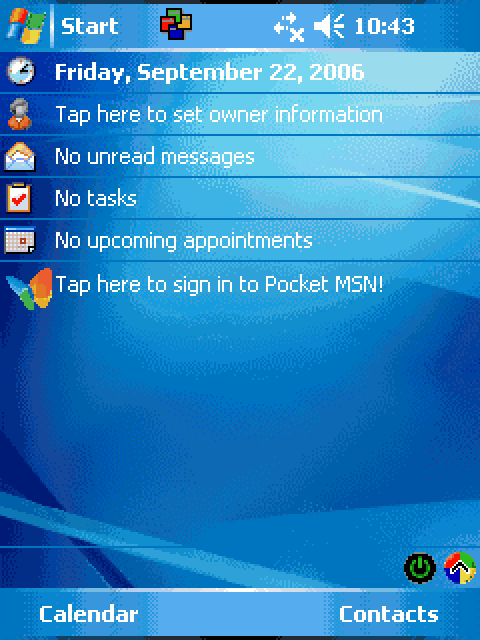
The story
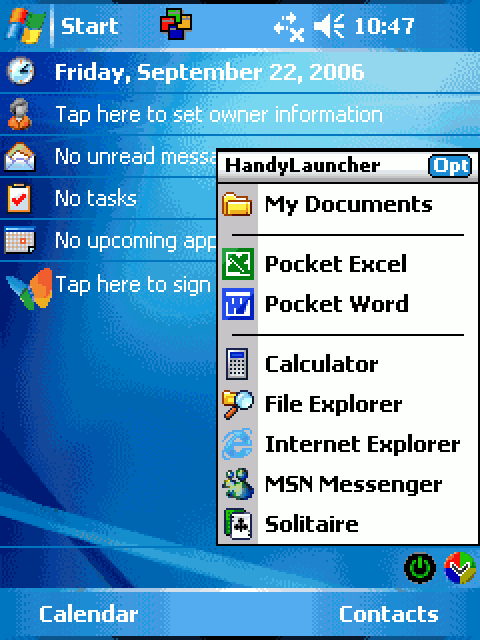
HandyLauncher put a tiny icon on the Today screen that opened your own menu of programs, folders and documents. Anything you wanted, one tap away, without filling the home screen. A second menu opened with tap-and-hold, so it held twice as many shortcuts.
From version 3.2 it did something clever. It turned the screen to portrait or landscape before opening each shortcut, so your spreadsheet always opened wide and your notes opened tall. Advanced users could even pass it command-line options, the way you pass flags to a script.
Every version
From DinarSoft’s revision history and installers. Press Run to play through them, or step one at a time.
-
HandyLauncher 1.0 August 23, 2003
- The first release.
-
HandyLauncher 2.0 August 12, 2004
- English and German.
- Colorful menus you design.
- A -X option to open the menu from the top of the screen.
-
HandyLauncher 3.0 September 24, 2004
- Two menus: one for tap, one for tap-and-hold, for twice the shortcuts.
-
HandyLauncher 3.2 March 11, 2005
- Turns the screen to portrait or landscape before it opens each shortcut.
-
HandyLauncher 3.3 November 8, 2005
- Windows Mobile 5 support.
-
HandyLauncher 3.4 March 15, 2006
- Square screens.
Build your own launcher
HandyLauncher put your favorite things one tap away. Its icon sat in the tray, in the corner of every Pocket PC screen. Tap it for one menu, tap and hold for a second one.
A shortcut could open anything: a program, a document, a folder, a song. Each one could even turn the screen sideways before it opened. Below are its two menus exactly as its installer wrote them, drawn by its own owner-drawn menu code. Beside them is its own Shortcut Setup page, rebuilt from the dialog templates inside HandyLauncher.exe. Add a shortcut, delete one, swap the menus, then tap the icon.
 10:47
10:47
- My Documents
- ----------------
- Pocket Excel
- Pocket Word
- ----------------
- Calculator
- File Explorer
- Internet Explorer
- MSN Messenger
- Solitaire
Shortcut Setup
Menu Name
Menu Items
Name :
Target :
Cmd. Line :
Shortcut Properties

Orientation :
The first menu is open, as its setup program filled it. Tap a shortcut to launch it.
The whole program is one file of 83,456 bytes for the Pocket PC. A small helper runs once at install time and writes the two starting menus into the registry. “HandyLauncher” holds My Documents, Pocket Excel, Pocket Word and five more, and “ExtraLauncher” holds My Device, MS Reader and the Games folder. Since version 2.0, the switch -X opens the menu from the top of the screen instead. Add a number to -X and it sets how far down, so a hardware button can open it too.
| 2002 to 2008 | 2026 | Why it is the same idea |
|---|---|---|
| An icon in the tray, the corner strip of small icons | A menu bar icon on a Mac, a quick-settings tile on Android | One tap from anywhere, without leaving what you are doing. |
SHRecognizeGesture: was it a tap, or a tap and hold? | A long press on a phone | One target, two actions. |
ChangeDisplaySettingsEx, found by name at run time | screen.orientation.lock() with feature detection | Turn the screen when the device can, carry on when it cannot. |
ShellExecuteEx: open this, whatever it is | Tapping a link, or open on a Mac | Name the thing; the system picks the app. |
| Menus kept as values in the registry | localStorage, or an app’s settings file | Settings that survive a restart. |
One icon, two menus
Since version 3.0, a quick tap opens the first menu and a tap and hold opens the second. Twice the shortcuts, behind the same little icon.
The clever part is how few lines it takes. When the stylus touches its icon, Windows Mobile sends HandyLauncher a message. It works out the corner of the screen from its size, so the same code fits a 240-pixel screen and a 480-pixel one. Then it hands that point to the system’s own gesture watcher. It answers with one number: zero for a tap, anything else for a hold. Press its icon below, quickly or slowly.
Press and hold its icon, or give it a quick tap.
- 12620
mov r3,#0BD0h / orr r3,r3,#5; its tray message, 0BD5h - 12628
cmp r1,r3 - 1262C
beq tray - 12724tray:
cmp r5,#201h; the stylus went down? - 12734
cmp r4,#1389h; on icon 5001, its own? - 12744
mov r3,#20; the form: 20 bytes - 12750
bl GetDeviceCaps; screen width - 12768
bl GetDeviceCaps; screen height - 1277C
bl WindowFromPoint; who owns the corner - 127D8
mov r3,#1; just tell me - 127E0
bl scale; 1, or 2 on VGA - 127F0
sub r0,r5,r3; menu y = height - 25 x scale - 12800
bl SHRecognizeGesture; watch the stylus - 12804
movs r3,r0 - 1280C
beq tap; 0: a tap - 12810
ldr r1,=menu2; held - 1281C
ldr r1,[r1,#218h]; Reverse on? swap - 126A0tap:
ldr r1,=menu1 - 126AC
ldr r1,[r1,#218h]; Reverse on? swap - 126C8
bl ShowMenu
-
case WM_TRAY:// 0BD5h -
if (!down || icon != 5001) break; -
SHRGINFO g = { sizeof g }; -
g.ptDown.x = width() - 2; -
g.ptDown.y = height() - 2; -
g.hwndClient = WindowFromPoint(pt); -
g.dwFlags = SHRG_RETURNCMD; -
menuY = height() - 25 * scale(); -
if (SHRecognizeGesture(&g))// held -
menu = reverse ? &m1 : &m2; -
else// a tap -
menu = reverse ? &m2 : &m1; -
ShowMenu(menu);
- r1
- menu 2 shown
Up it comes: ExtraLauncher, the second menu.
For engineers: the gesture form
The form is a SHRGINFO: 20 bytes holding its own size, the window to watch, the point where the stylus came down and a flag. HandyLauncher sets the flag to SHRG_RETURNCMD (1), so Windows Mobile draws its red dots, waits, and returns GN_CONTEXTMENU for a hold instead of sending a message. The tray message number is 0BD5h and the icon number 5001, both its own. The menus live at 1D458h (first) and 1D238h (second); the Reverse setting at 1C2B8h + 218h swaps the two pointers before the menu opens. The scale comes from sub_19078, which reads the screen’s width and height once and answers 2 when either is 480.
Each program, its own way up
Some programs are happier sideways. A spreadsheet wants a wide screen; a book wants a tall one. From version 3.2, each shortcut in HandyLauncher can carry its own orientation: Portrait, Landscape (R), Landscape (L), or Use Current.
The call that turns the screen only exists on Pocket PCs from 2003 Second Edition on. Instead of refusing to start on older ones, HandyLauncher looks the call up by name the first time it needs it, and remembers the answer. Then it asks where the screen is now, and only turns it when it has to.
Landscape (R): the screen turns to 90° before Pocket Excel opens.
- 18F28
ldr r0,[r4,#8]; looked it up before? - 18F38
bl LoadLibraryW; "coredll.dll" - 18F44
bl GetProcAddressW; "ChangeDisplaySettingsEx" - 18F94
cmp r6,#0; the shortcut setting - 18F98
beq done; 0: Use Current - 18FB8
mov r8,#0C0h; the form: 0C0h bytes - 18FBC
mov r5,#800000h; orientation only - 18FC8
mov r3,#2; CDS_TEST: just ask - 18FE4
mov pc,fp; call it - 19014
mov r6,r4; Portrait: 0 - 1900C
mov r6,#1; Landscape (R): 90 - 19000
mov r6,#4; Landscape (L): 270 - 19024
cmp r6,r3 / beq done; already there? - 19054
str r6,[sp,#188h]; the new orientation - 1906C
mov pc,fp; call it again: turn
-
if (!looked) { -
cds = find("ChangeDisplaySettingsEx"); -
if (!cds || setting == 0) -
return;// Use Current -
DEVMODE dm = { .dmSize = 0xC0 }; -
cds(NULL, &dm, NULL, CDS_TEST, NULL); -
want = DMDO[setting];// 0, 90 or 270 -
if (want == now) return; -
dm.dmDisplayOrientation = want; -
cds(NULL, &dm, NULL, 0, NULL);// turn
- r3
- 0 apply
…and this time flag 0: do it. The screen turns to 90°, then the program opens.
Programs, documents, folders, songs
A launcher that only launched programs would be half a launcher. HandyLauncher takes anything you can name, and asks a single question first: is this a folder?
A folder, or the top of the whole device, opens in File Explorer. Everything else goes to ShellExecuteEx, and Windows works out the rest: a program starts, a document opens in Pocket Word, a song in Windows Media Player. In today’s terms the whole function is one line:
isFolder(target) ? open('fexplore.exe', target) : open(target); // the system picks the app\My Documents\Letter.pswa file- File Explorer
- The program itself
- Pocket Word
- Windows Media Player
A document: Windows looks up its type and opens Pocket Word.
- 190EC
bl FindFirstFileW; what is the target? - 190FC
bl FindClose - 19104
ands r3,r3,#10h; the folder bit - 19108
movne r5,r4; folder: it becomes the argument - 1910C
ldrne r4,=fexplore; and File Explorer the program - 19118
bl lstrcmpW; the root, "\"? - 19128
ldreq r4,=fexplore - 19138
mov r3,#60; the form: 60 bytes - 1913C
str r4,[sp,#10h]; what to open - 19160
strne r5,[sp,#14h]; its argument - 19178
bl ShellExecuteEx; Windows opens it
-
h = FindFirstFile(target, &fd); -
if (h != INVALID_HANDLE_VALUE) -
if (isDir(fd)) explore(target); -
if (!lstrcmp(target, L"\\")) -
explore(target); -
sei = { 60, ..., target, args }; -
ShellExecuteEx(&sei);// Windows picks
- r0
- 1 opened
It does not need to know which program opens it. Windows looks up the file type and picks one, like a double-click.
One engine, three apps
HandyLauncher, HandySwitcher and HandyMenu look like three programs. Inside, they share one engine that DinarSoft wrote once and built into all three.
The bytes show it. Every program file lists its functions in a small table. Line up the 2006 builds of all three apps, set aside the addresses (each program puts things in different places), and whole functions match, instruction for instruction. They cover how a Pocket PC’s code is read and folded, the key engine and the disguised install date. They also cover the theme colors, the font that scales with the screen, the icon builder and the color picker. In this map, each block is one of HandyLauncher’s 161 functions, as wide as its code.
24 functions 4,508 bytes of code, instruction for instruction, in all three apps
also in HandySwitcher 2.7 and HandyMenu 3.6 HandyLauncher’s own 161 functions, 37,912 bytes in all. Tap a lit block with a dark edge.
HandySwitcher 2.7 0x124A0
- 124A0
push {r4, r5, r6, r7, r8, sb, lr} - 124A4
sub sp, sp, #0x1ec - 124A8
mov r6, r0 - 124AC
mov r4, r1 - 124B0
bl #0x1a7fcwcslen - 124B4
mov sb, r0 - 124B8
mov r0, r4 - 124BC
bl #0x1a7fcwcslen - 124C0
mov r2, #0xf2 - 124C4
mov r5, r0 - 124C8
mov r1, #0 - 124CC
add r0, sp, #0 - 124D0
bl #0x1a91cmemset - 124D4
mov r2, #0xf2
HandyLauncher 3.4 0x156C8
- 156C8
push {r4, r5, r6, r7, r8, sb, lr} - 156CC
sub sp, sp, #0x1ec - 156D0
mov r6, r0 - 156D4
mov r4, r1 - 156D8
bl #0x1a280wcslen - 156DC
mov sb, r0 - 156E0
mov r0, r4 - 156E4
bl #0x1a280wcslen - 156E8
mov r2, #0xf2 - 156EC
mov r5, r0 - 156F0
mov r1, #0 - 156F4
add r0, sp, #0 - 156F8
bl #0x1a40cmemset - 156FC
mov r2, #0xf2
HandyMenu 3.6 0x17ED0
- 17ED0
push {r4, r5, r6, r7, r8, sb, lr} - 17ED4
sub sp, sp, #0x1ec - 17ED8
mov r6, r0 - 17EDC
mov r4, r1 - 17EE0
bl #0x18b40wcslen - 17EE4
mov sb, r0 - 17EE8
mov r0, r4 - 17EEC
bl #0x18b40wcslen - 17EF0
mov r2, #0xf2 - 17EF4
mov r5, r0 - 17EF8
mov r1, #0 - 17EFC
add r0, sp, #0 - 17F00
bl #0x18b64memset - 17F04
mov r2, #0xf2
The key engine: a 120-number shuffle keyed by the product name: 484 bytes. The same instructions in all three files. Only the addresses move, because each program puts it in a different place.

Your Pocket PC Code:
BC11 - 18CC - CSRB - C9RG
Enter Your Unlock Key Here:
Custom Colors
Menu Text
Menu Background
Icons Background
Highlighted Text
Highlighted Background
Menu Colors :
The same goes for the screens around the engine. The License Key dialog and the Custom Colors page carry the same controls and the same words in all three apps. When DinarSoft made one of them better, all three got better.
For engineers: how the functions were compared
Function bounds come from each file’s .pdata section. Each function is disassembled with Capstone; branch targets inside the function become offsets, calls to other functions become a placeholder, calls to Windows keep their names, and every literal loaded from the code keeps its value unless it points into the program, which becomes a placeholder too. Strings stay as strings. Two functions count as the same when what is left matches exactly. Pairwise, HandySwitcher 2.7 and HandyLauncher 3.4 share 27 functions (5,080 bytes), HandySwitcher and HandyMenu 3.6 share 31, and HandyLauncher and HandyMenu 27. The script is research/dinarsoft/re/handylauncher/shared.py.
The keys that open every copy
HandyLauncher was shareware: fifteen days to try it, then a sixteen-letter key. DinarSoft also built in a handful of keys that open every copy, on every device.
When you install it, the installer leaves the date in a small file, \Windows\mcterthr.dat. It is disguised as fourteen bytes with a checksum, so a curious hand cannot read it and a changed byte is caught. HandyLauncher counts the days from there. A normal key belongs to one device. The app reads the device’s ID and folds it into the sixteen characters shown on its License Key page as “Your Pocket PC Code”. Then it runs them through the key engine with the product name, HandyLauncher3. If your key matches, you are registered.
If it does not match, HandyLauncher tries again with five built-in sixteen-letter names instead of the device code. One is Yasser’s own, YASSERMOHAMEDALI. One is GIVEAWAYVERSION1, a give-away version, as its name says. Three are names from his family. A key made from any of them opens every copy. HandyLauncher even compares those keys with a loop of its own and a little arithmetic, so a cracker waiting on the usual compare call never sees them go by.
All sixteen letters match: registered.
- 11F8C
bl lstrcmpW; the key for this device? - 11F98
ldr r1,=YASSERMOHAMEDALI; a built-in name - 11FB8
bl keyengine; with "HandyLauncher3" - 11FC4
cmp r4,r0; same length? - 11FD8next:
add r2,sp,#14h; from the last letter - 11FEC
cmp r2,r3; one letter - 12088
mov r0,#5; a letter differs - 12000
mov r0,#7; all the same - 12004
rsb r3,r0,#25 / cmp r3,#18; 25 - 7 = 18?
-
if (!lstrcmp(key(code), t)) ok(); -
wcscpy(buf, NAMES[i]); -
key(buf, L"HandyLauncher3"); -
if (wcslen(t) == wcslen(buf)) { -
int k = n; -
while (k && buf[k-1] == t[k-1]) k--; -
if (k) r0 = 5;// differs -
else r0 = 7;// all the same -
if (25 - r0 == 18) ok(); }
- r3
- 18 registered
25 minus 7 is 18: registered. A cracker looking for a “compare” call finds none here, only arithmetic.
HandyLauncher 3.4, every deviceFJAA - ZCHS - TETU - NPAQ
In 2026, Yasser Awad released HandyLauncher as freeware. This key is made from his own name, YASSERMOHAMEDALI, by the same engine. Type it on the License Key page, four letters in each box. HandyLauncher’s own check, run on an emulated ARM processor, unlocks it with this key, and stays locked for a key that does not match.
Awards and reviews
| App | 2003 | 2004 | 2005 | 2006 | 2007 | 2008 |
|---|---|---|---|---|---|---|
| HandyLauncher | No entry | No entry | No entry | No entry | Nominee | Nominee |
NomineeHandyLauncher, 2007, Today Launchers
NomineeHandyLauncher, 2008

Download
Here are all 3 installers the Internet Archive kept, as DinarSoft published them. Take the one marked latest: the .CAB installs straight on the device, the .exe installs from a Windows PC.
| File | Version | Size | SHA-256 |
|---|---|---|---|
| DinarSoftHandyLauncher34.CABInstall on the Pocket PC · latestRecovered from the Internet Archive (Wayback Machine, December 22, 2006) | 3.4 | 102.9 KB | 1f7be507d2dccfd06a1e86ca7bea95183c2809696f0b67fc0c526d524c3dcb96 |
| DinarSoftHandyLauncher34_Setup.exeRun on a Windows PC with ActiveSync · latestRecovered from the Internet Archive (Wayback Machine, July 13, 2007) | 3.4 | 153 KB | 3224c50bbe72687325ff0ebab65733ccbddf6b4f35d3d26fee57d9be51a9ee6e |
| DinarSoftHandyLauncher34.exeRun on a Windows PC with ActiveSyncRecovered from the Internet Archive (Wayback Machine, December 16, 2006) | 3.4 | 204 KB | 431dbe604331b81c7654ea388fcb7c814d53e0212a9310b37d078c8b5904e3a3 |
Pick an installer you downloaded. Your browser computes its SHA-256 fingerprint on your own device, nothing is uploaded, and looks for it among all 24 DinarSoft files. A match means every byte is the one the Internet Archive kept.
Unlock the full version
Every DinarSoft trial asked for an unlock key after 15 days. In 2026 Yasser Awad made HandyLauncher free, so here is the key, made the way DinarSoft made it.
One key for every device: HandyLauncher 3.4 accepts a key made from Yasser’s own name. Tap Register… on the About page and type the four groups of four letters.
For HandyLauncher 3.4.
Install it
- On a Pocket PC or Windows Mobile phone. Download the .CAB file marked latest. Copy it to the device on a memory card, through ActiveSync, or download it in Pocket Internet Explorer. Then open File Explorer on the device and tap it. It installs itself, like tapping an .apk on Android.
- From a Windows PC. Connect the device through ActiveSync on Windows XP, or Windows Mobile Device Center on later Windows, and run the Setup .exe. It sends the app to the device.
- In an emulator. Microsoft’s Device Emulator runs Windows Mobile 5 and 6 on a Windows PC. In its File menu, choose Configure and set a shared folder. The device sees that folder as its Storage Card. Put the .CAB there and tap it in File Explorer.
- Unlock it. Open HandyLauncher, find its Register screen, and type the key from this page.