From Port Said to Kanata
Yasser Awad taught a PC to write Arabic in Port Said. Then he brought Arabic to Windows in Cairo, built the public door into phone companies’ networks in Canada, and ran his own award-winning software company. Drag through the years: the screen grows up with him.
1991
Writing his own programs in Port Said, Egypt
16 colors
- ARABART, his Arabic engine, draws its first letters.
- PESM draws the Basmallah sixteen times, with its own copy of the engine.
- A screensaver for the Port Said Governorate, in 156 bytes of code.
Port Said, 1991 to 1993
It started on the Mediterranean, with a few books, Borland’s tools and no internet.
In Port Said he wrote fifteen programs and ARABART, the engine that joins Arabic letters on a DOS screen. A screensaver for the governorate. A boot screen for every PC that Port Said Computer Systems sold, paid for with his first mouse. An antivirus. A circuit simulator for his graduation project with the KEMYAM group. And The Brave Sun, which took 3rd place in the PC Middle East competition for Arabic educational software.
Every one of them runs in your browser. The name on the right is drawn by his own engine, from his own font bytes: pick a font and a style.
Cairo, 1993: Arabic comes to Windows
In June 1993 he joined Sakhr in Cairo as a project leader, and stayed until September 1996.
Sakhr was founded in Kuwait in 1982 and moved to Cairo in 1990. It made Arabic MSX home computers and the first Arabic version of Windows 3.x. Windows was built for English: text runs left to right, and every letter has one shape. Arabic needs both rules turned around, often on the same line.
The problem he had solved alone on DOS with ARABART now had to work inside every Windows program. At Sakhr he built these parts of its Arabic software:
Arabic APIs
One set of Arabic functions that any program could call, on Arabic Windows and on English Windows alike. Like a shared package every app imports, so no team writes Arabic support twice.
A bilingual text displayer
Object-oriented, and used in the Al-Ustaz word processor. It put Arabic and English on one line, each in its own direction. Your browser does this for you today; in 1993 someone had to write it.
A printing core
Multi-threaded: Arabic pages went to the printer in the background while you kept working.
Arabic office applications
The programs people used to write, print and publish in Arabic.
An installer framework
The company’s first multimedia installer framework: one tool that set up each new title on a PC, the way every app’s setup program does today.
Two directions, one line
Memory keeps words in the order you typed them. The screen must show them in reading order: Arabic from the right, and English inside it from the left. That reordering is the heart of a bilingual text displayer. Type a line word by word and watch each word find its place.
- 1مرحبا
- 2Yasser
- 3Awad
- 4من
- 5القاهرة
- 5القاهرة
- 4من
- 2Yasser
- 3Awad
- 1مرحبا
“Hello, Yasser Awad, from Cairo”. Read it from the right. Arabic words go right to left; the English words keep their own order inside.
Print, and keep typing
A thread is a separate line of work inside one program. With printing on its own thread, a long Arabic document goes to the printer while you keep writing. Try it both ways.
Press Print, then try to type.
Kanata, 1996: the door into the network
In October 1996 he moved to Canada and joined Newbridge Networks in Kanata. For ten years he was a senior designer and team leader there.
Alcatel bought Newbridge in 2000, and with it the 5620 Network Manager: the control room for a phone company’s whole network of switches and routers. In 2003 one 5620 managed up to 10,000 core nodes and 500,000 edge nodes.
Yasser Awad was the architect of the 5620 CORBA interface. It is the door through which a phone company’s own systems read alarms and inventory, and order new connections.
Today you would call it the network’s public API.
What his interface did, in plain words
The network. A phone company’s network is thousands of machines in buildings across a country: the switches and routers that carry every call and every byte. The 5620 was the one program that watched and controlled all of them. Think of the AWS console, for a phone company’s own hardware.
The problem. The phone company also ran its own business software, its OSS: customer orders, billing, repair tickets. These programs came from many vendors, in many languages, on many kinds of computers. Each one needed the 5620: to read its alarms, to list its equipment, and to set up a new line when a customer ordered one. REST and JSON did not exist yet.
The tool of the day. CORBA was the standard way for a program on one computer to call a function in a program on another. You write the calls down once, in an interface file. A compiler turns that file into code for both sides, each in its own language. After that, a call to the 5620 looks like a normal function call. It is the idea behind gRPC and its .proto files, twenty years earlier.
His part. Yasser designed that door into the 5620: what outside systems could see, which calls they could make, and how each call reached the network. When a customer ordered a line, the order system could now set up the connection by itself, with no engineer in between. He also built the alarm feed, an event channel twice as fast as the standard one, and jidmTester, a tool that tested the whole interface.
- One contract for both sides. The interface file,
Alarms.idl, lists every call. A compiler turns it into code for the billing system and for the 5620. Today: a.protofile andprotoc. - The billing app calls
alarms->getActiveAlarms(), like any function in its own code. What it calls is a stub: generated code that only looks like the real thing. - The stub packs the call into bytes, and the ORB, a library on each side, sends them across the network. Every CORBA message starts with the four letters
GIOP. - On the 5620, the other ORB receives the bytes. The skeleton, also generated, unpacks them and calls his code, which reads the alarms from the network.
- The answer goes back the same way. The billing app gets its list of alarms as if the function had run on its own computer. Nobody typed a command.
Now call the network yourself
Press a button: the call goes through his interface to the 5620 and back. Take a node down, and its alarm goes out through his event channel to every app that listens.
CORBA, in his years (example names)
alarms->getActiveAlarms()
The same call today, as REST
GET /alarms?state=active
Pick a call. It goes through his interface to the 5620, and the answer comes back the same way.
| 1996 to 2006 | 2026 | Why it is the same idea |
|---|---|---|
| The 5620 CORBA interface | A public REST or gRPC API with a published spec | A documented door that outside systems use to read the network and change it. |
A CORBA IDL file | A gRPC .proto file | One interface file becomes typed client and server code in many languages. |
| An event channel | A Kafka topic or a cloud pub/sub topic | Senders and receivers never need to know each other; one event reaches every subscriber. |
| JIDM translation rules | Code generated from a schema, and gateways such as grpc-gateway | Turn one interface into another, and translate calls while the system runs. |
For engineers: CORBA, JIDM and the standards around his interface
- CORBA in 2026 terms. You write an IDL interface; the IDL compiler makes a client stub and a server skeleton; the ORB packs each call and sends it over IIOP, a protocol on TCP. Unlike gRPC, the client holds a reference to one remote object, and that object keeps its state between calls.
- Telecom’s own models. Telecom standards describe equipment as managed objects in GDMO, reached over CMIP. The 5620 had both doors: a CMIP interface and his CORBA interface.
- JIDM, part 1: Specification Translation (X/Open, May 1997) turns a GDMO model into IDL: each managed object class becomes an IDL interface, attributes become get and set operations, actions become operations, and notifications become events. His interface followed these rules, so a CORBA client saw the same objects as a CMIP client.
- JIDM, part 2: Interaction Translation. A gateway that turns CORBA calls into CMIP or SNMP operations, and their events back into CORBA events. The Open Group published both parts as C802 in 2000. OMG’s “Interworking Between CORBA and TMN Systems” followed in August 2000, and ITU-T’s X.780 and Q.816 in January 2001.
- The 2003 figures come from Gartner’s product report on the 5620 Network Manager family: version 6.1 on Solaris 8 with an Informix database, managing Alcatel 7770, 7670, 7470 and 7300 equipment.

Kanata, 2002: his own company
In November 2002 he founded DinarSoft, and with his co-developer, Hosam Aly, built six apps for Pocket PC and Windows Mobile, the smartphones of their day.
Each one fixed something people met every day on their phones: memory that ran out, programs that never really closed, settings buried deep in menus. Reviewers from the US, the UK, New Zealand and the UAE wrote about them, on about 20 sites in all. Russia’s CHIP magazine put MemMaid and HandySwitcher on its cover discs.
Smartphone & Pocket PC magazine named HandySwitcher the best Task Manager in 2007 and again in 2008, and TapText the best Misc. Utility of 2007.
From 2003 to 2008 his apps earned 22 nominations, and MemMaid was a finalist four years running.
Solution ‘DinarSoft’ (6 projects)
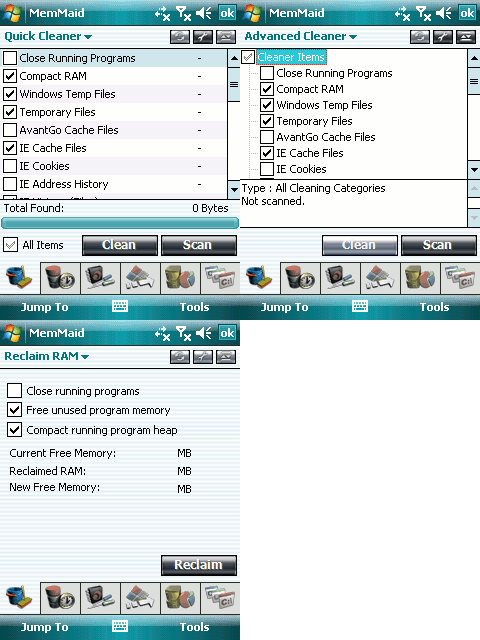
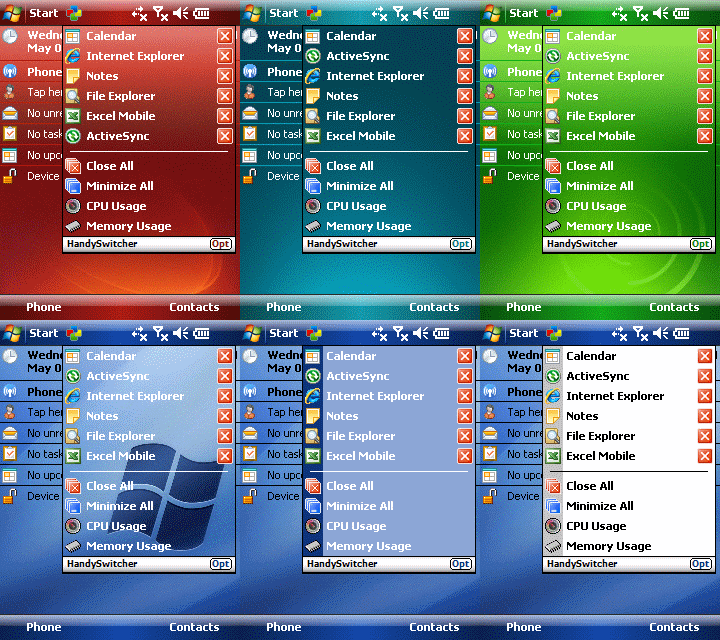
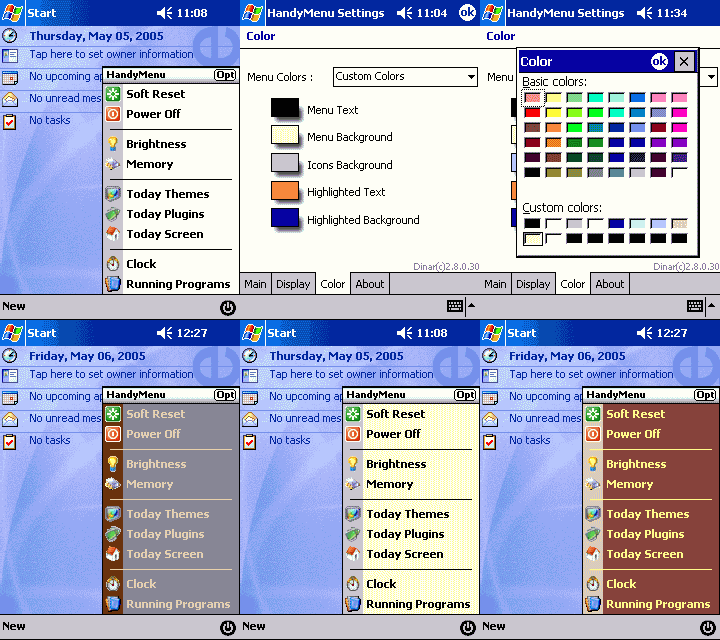
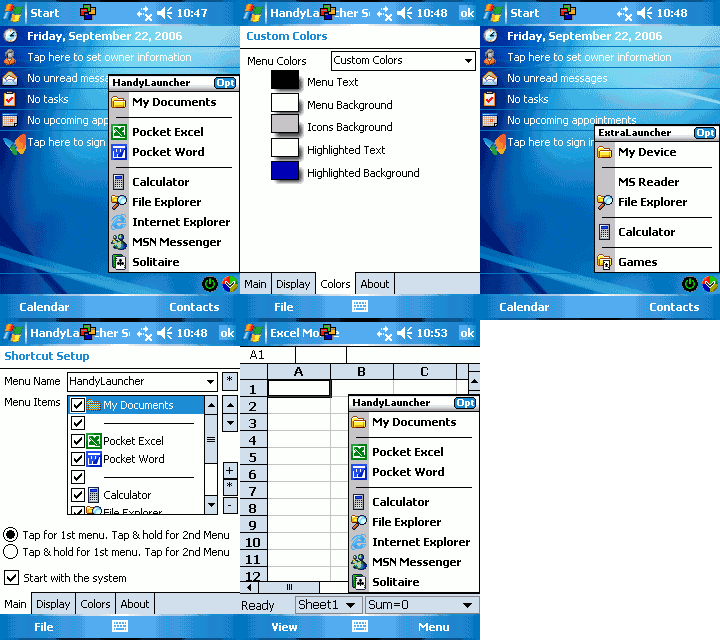

- Name
- MemMaid
- Slogan
- The Best Maid for PocketPCs
- Does
- Cleans the phone: frees memory, clears temporary files, and manages the programs and services that start with it. From 2.0, a registry editor too.
- First
- 1.0, June 2003
- Latest
- 2.3, June 2008
- Awards
- Finalist four years running, 2005 to 2008
- Review
- “The Swiss Army Knife of PPC utilities.” eMobie, 2004
- Name
- HandySwitcher
- Slogan
- The Ultimate Task Manager
- Does
- A task switcher with an X button that really closes programs, plus Close All, hardware keys and skins.
- First
- 1.0, September 2003
- Latest
- 3.1, April 2008
- Awards
- Best Task Manager, 2007 and 2008
- Review
- “A simple-yet-powerful application.” GadgetMix, 2007
- Name
- HandyMenu
- Slogan
- Powerful System Access
- Does
- A menu in the corner of the screen: soft reset, power off, brightness, memory, the Today screen and running programs. In five languages.
- First
- 1.0, July 2003
- Latest
- 3.6, March 2006
- Awards
- Finalist, System and Registry, 2008
- Review
- “A steal at $5.99!” Pocket PC Thoughts, 2004
- Name
- HandyLauncher
- Slogan
- The Seamless Launcher
- Does
- Opens programs and documents from the corner of the screen, each one in the screen direction you choose.
- First
- 1.0, August 2003
- Latest
- 3.4, March 2006
- Awards
- Nominee, 2007 and 2008
- Name
- TapText
- Slogan
- More Text, Less Taps.
- Does
- Saved phrases and date stamps, typed into any program in two taps.
- First
- 1.0, March 2005
- Latest
- 1.3, February 2006
- Awards
- Best Misc. Utility, 2007; finalist, 2008
- Review
- “TapText is quickly becoming a utility that I can’t live without.” Pocket PC Thoughts, 2006
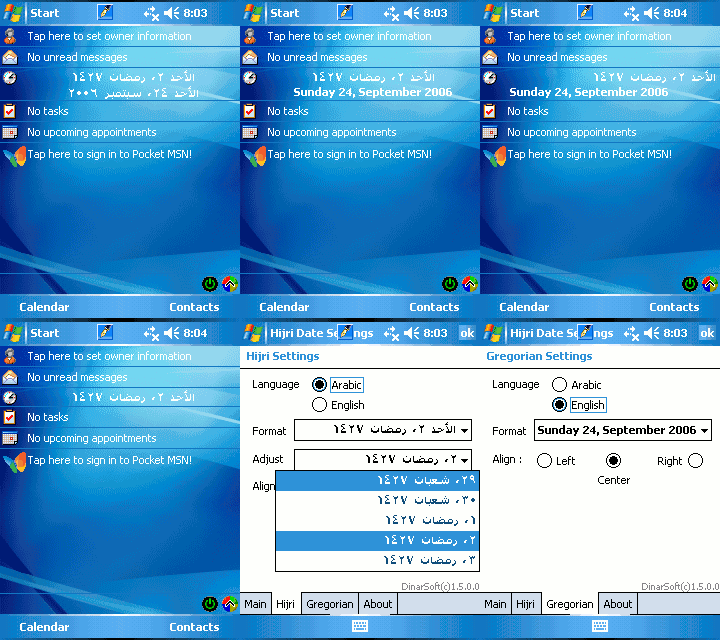
- Name
- HijriDate
- Slogan
- What is Today
- Does
- The Hijri and the Gregorian date on the Today screen, in Arabic or English, calculated for Mecca.
- First
- 1.0, June 2003
- Latest
- 1.5
| App | 2003 | 2004 | 2005 | 2006 | 2007 | 2008 |
|---|---|---|---|---|---|---|
| MemMaid | Nominee | Finalist | Finalist | Finalist | Finalist | |
| HandySwitcher | Nominee | Nominee | Nominee | Winner | Winner | |
| HandyMenu | Nominee | Nominee | Nominee | Nominee | Nominee | Finalist |
| HandyLauncher | Nominee | Nominee | ||||
| TapText | Nominee | Nominee | Winner | Finalist |
22 nominations · 3 wins · 6 more finalist places
All six were shareware: a 15-day trial, then a 16-letter unlock key. MemMaid went from 1.0 on 16 June 2003 to 2.3 on 16 June 2008, five years to the day. Visit DinarSoft for every app, every review and every screen.
Look at the HijriDate screen: the Islamic date in Arabic, on a phone built for English. ARABART put Arabic on DOS screens in 1991, Sakhr put it into Windows, and HijriDate put it in his customers’ pockets. The same thread, all the way through.