Text Editor: Sample GUI
1993 · C:\EDIT\EDIT.EXE
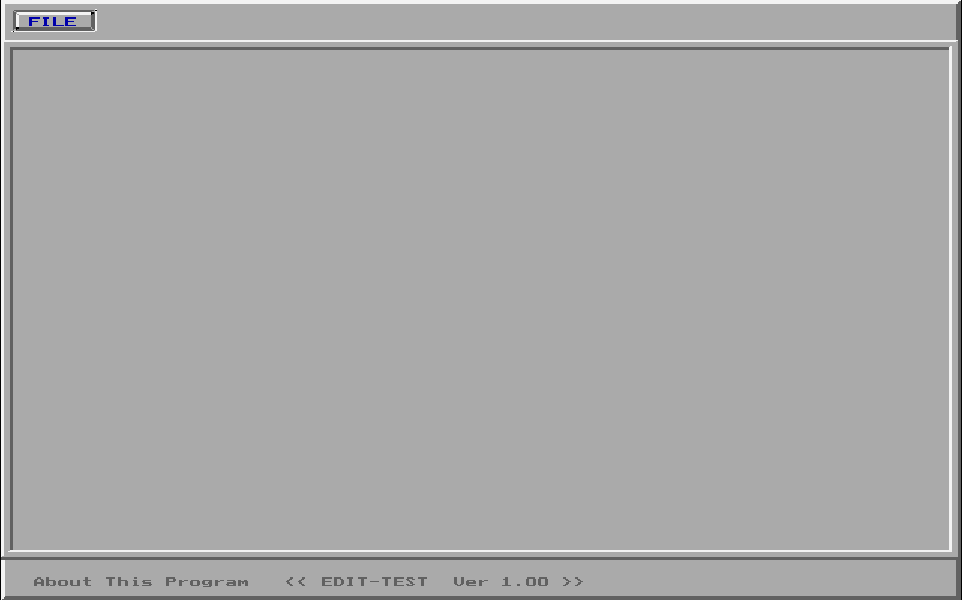
Loading EDIT.EXE, 62 KB
The text editor he wrote to get his first job, with menus and windows, built on the Digi-Test interface.
The story
For his first professional job, Yasser was set an assignment: a text editor that loads and saves files, scrolls, moves the cursor and switches between insert and overwrite. He wrote two. For EDIT.EXE he took the window system of Digi-Test, his graduation project, and added one new C++ class, TextEditor. The menus, dialogs and windows came along for free. The old code hands every key to the new class through one virtual method call, without ever knowing the editor exists.
Built from his own parts
For a job interview he needed a text editor, fast. So he opened his graduation project, Digi-Test, kept its windows, menus and dialogs, and added one new thing: a text editor class.
It is what a developer does today when a new app starts from the component library of the last one. In EDIT.EXE you can count it: 89 of its 124 functions are the same as functions in Digi-Test, instruction for instruction. Step through to watch each part arrive, or pick any block to read it.
35 are new. 22 of them are his TextEditor class. So 89 of 124 functions, and 12,674 of 17,393 instructions, came straight from Digi-Test.
The copy came whole, the way you would vendor a package into a project. Digi-Test’s circuit menus still sit inside
EDIT.EXE, and so do the names of the five KEMYAM students who built it, his own last. Of all his text in the program,
only three lines are new: the title EDIT-TEST Ver 1.00, the prompt for a file name, and the first file
name, NONAME.TXT.
For engineers: how the functions were matched
Both programs were cut into functions at their entry code, and every function was turned into its list of instruction types, ignoring the addresses that change from one build to the next. That is opcode matching. Two lists that are equal mean the same source code. 124 of EDIT’s functions are long enough to compare (12 instructions or more); 89 match a Digi-Test function exactly, 12,674 of 17,393 instructions. Segment 02D1, his TextEditor class, matches nothing: it is all new.
"NODE CTRL N " ; Digi-Test: place a circuit node "VCC CTRL V " ; Digi-Test: place a power pin " DETECT FAULT " ; Digi-Test: test a real circuit " TRUTH TABLE " " Yasser Mohamed " ; the last of the five KEMYAM names "NONAME.TXT" ; new for EDIT " Name To Save/Load " ; new for EDIT "About This Program << EDIT-TEST Ver 1.00 >>" ; new for EDIT One new class
The new part is a C++ class, TextEditor: 22 functions in one block of memory, 6,688 bytes.
One object of it takes 80 bytes. The first 42 are exactly a Digi-Test window: where it sits, how big it is, and which
table of methods it uses. The other 38 are his: the cursor’s line and column, the tab width, insert or overwrite, room
for 500 lines, and the file name. In today’s words, class TextEditor extends Window, written in Borland
C++ in 1993. Step through the code that runs when the editor is made with new:
newasks the heap for 80 bytes: one empty TextEditor object.- First, Digi-Test’s own window constructor runs, unchanged (
0B2D:0004). It fills in the window part and writes its method table,05EEh, at28h. - Then his constructor writes his own table,
00ADh, over it. From now on the object answers as an editor. Slots 3 and 4 point to the same code as before: inherited. - His own fields: line 0, column 0, a tab of 8 spaces, insert mode, room for 500 lines.
- A second block, 2,000 bytes: the line table, 500 slots of 4 bytes each. Its address goes in the field at
24h. - A loop clears all 500 slots to zero: no lines yet.
- Line 0 gets its own 255-byte block, all zeros, and the file name starts as
NONAME.TXT. The editor is ready.
| 1991 to 1993 | 2026 | Why it is the same idea |
|---|---|---|
| A TextEditor class built on Digi-Test’s window class | class TextEditor extends Window in TypeScript | The child gets everything the parent has and replaces only what it needs. |
| One hidden field: the address of the class’s method table | The prototype link behind every JavaScript object | One hidden pointer per object says where its methods live. |
How a key finds the editor
Digi-Test’s key loop was written before the editor existed. It still hands every key to his new code, with three instructions and a table.
- Key loop0473:0257key =
1E61h, an a - The applicationone objectfield 2Ah → the window in front
- His TextEditor object80 bytesfield 28h → table
00ADh - Method table
00ADh- 0
02D1:03B9draw - 1
02D1:0C3E - 2
02D1:040Dkey - 3
02D1:1A02 - 4
02D1:1A12
- 0
- Runs
02D1:040Dhis key handler
- 0257
call far 0B23:000C; read a key - 025F
mov es:[bx],ax; keep it in the event - 0269
cmp ax,2D00h; Alt+X? - 026C
je 0270; then stop - 0294
les bx,[bp+6]; the application - 0297
les bx,es:[bx+2Ah]; its window in front - 029B
mov bx,es:[bx+28h]; that window’s method table - 029F
call far [bx+8]; slot 2: handle the key - 02DB
jmp 0257; next key
-
for (;;) { -
ev.key = readKey(); -
if (ev.key == ALT_X) break; -
Window far *w = app->front; -
w->handleKey(&ev);// virtual -
}
- AX
- 1E61h the key: scan code 1Eh, letter a
- BX
- 00ADh the method table
Back to the top for the next key.
This is the heart of object-oriented code, and it is why his reuse worked. The loop only knows “the window in front” and asks it to handle the key. The window’s method table decides which code runs. Put a plain Digi-Test window in front, above, and the same three instructions land in Digi-Test’s handler instead. A browser does the same today when it hands a click to whatever element you clicked. So does a UI framework when it calls your component’s handler. The event loop stays the same, and each kind of window brings its own behavior.
Type into his line
Every line of text has its own block of 255 bytes. Type below, and his insert routine runs on every key.
if (ch == '\t') { n = tab; ch = ' '; }a Tab is 8 spacesif (col + n - 1 >= 255) return;is there room in the line?if (col > len) memset(line + len, ' ', col - len);past the end? fill the gap with spacesif (!overwrite || n > 1) movmem(line + col, line + col + n, 255 - col);insert: slide the rest rightmemset(line + col, ch, n);write the key
Click the line and type. An l fixes “Helo”: his code slides the rest of the line one place right, then writes the letter into the gap.
The editor keeps a table of 500 line slots, 2,000 bytes in all. A line gets its block only when you first type on
it, so an empty file costs almost nothing. Insert is the in-place version of s.slice(0, i) + key + s.slice(i)
in JavaScript. His movmem slides the rest of the line to the right inside its own block, and the key
drops into the gap. No other line is ever touched.
Press Past the end, then type. EDIT lets the cursor stand anywhere on the line and fills the gap with spaces when a key arrives, a feature editors still call virtual space. Switch to Overwrite and a key replaces the byte under the cursor, while a Tab still opens 8 fresh spaces.
For engineers: the insert routine
cmp byte ptr [bp+0Ah],9 ; is the key a Tab? mov si,es:[bx+3Ah] ; yes: width = the tab width, 8 mov byte ptr [bp+0Ah],20h ; and write spaces mov si,1 ; a letter: width 1 mov ax,es:[bx+38h] ; the cursor column cmp ax,0FFh ; column + width - 1 inside the 255 bytes? cmp es:[bx+38h],di ; cursor past the end of the text? call far 0000:1D22 ; memset(line + len, 20h, col - len): fill the gap cmp word ptr es:[bx+42h],0 ; insert mode? call far 0000:1D41 ; movmem(line + col, line + col + n, 255 - col) call far 0000:1D22 ; memset(line + col, ch, n): the key Every Byte of EDIT.EXE
Each square is one byte of the program in memory, colored by what it is. Tap a part to open it in the full map, down to the single instruction.
36,526 bytes on the disk, packed by DIET
79,200 bytes in memory, 44,603 of them his own code
- Code54%
- Borland library33%
- Fix-up list6.7%
- Text2.8%
- Data2.7%
- Start-up code0.7%
- Stack0.2%
- Header<0.1%
- Empty space<0.1%
The biggest parts, his first
- main, menus and dialogs (0541)15,712 bytesYasser
- Window classes (0B2D)8,160 bytesYasser
- Digi-Test code (092A)8,080 bytesYasser
- TextEditor class (segment 02D1)6,688 bytesYasser
- His strings and method tables2,203 bytesYasser
- Digi-Test code (04BB)2,144 bytesYasser
Mapped by hand from the program’s own bytes.