Text Editor: Demo
1993 · C:\EDIT\EDITOR.EXE
Loading EDITOR.EXE, 62 KB
A second editor for the same job interview, with the look of Windows 3. He built it in three evenings.
The story
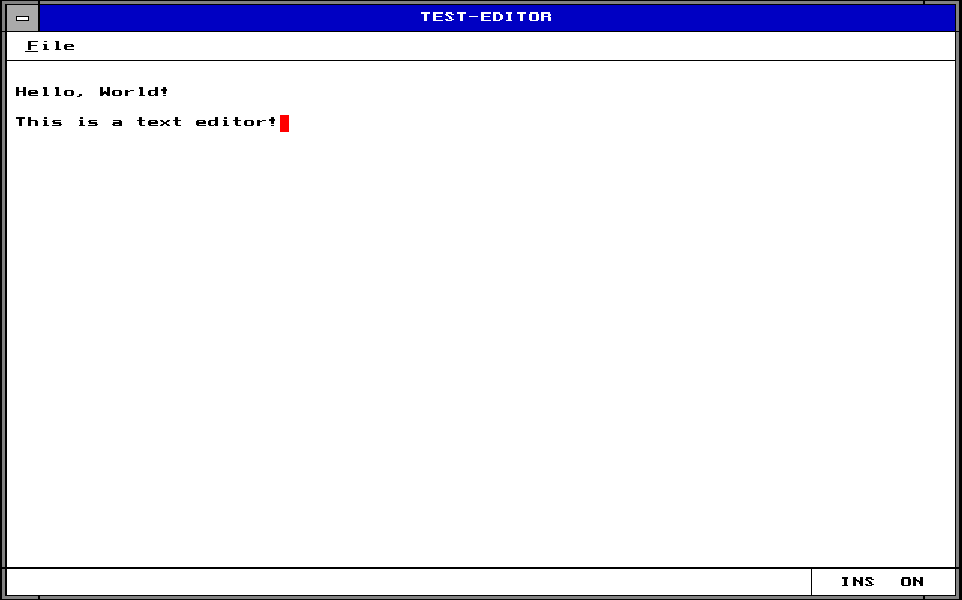
Yasser wrote a second editor for the same assignment from scratch, between Thursday 7 and Saturday 9 October 1993: three source files, 838 lines. WINGRAPH.CPP paints a Windows 3 look on the VGA screen with 5 palette colors of its own. EDITOR.CPP sends every key through a switch of 22 cases. FUNCTION.CPP keeps each line of text in its own 204-byte block, behind a table of 601 pointers. The red cursor is XOR drawing: draw it twice and it is gone.
Windows 3, drawn by hand
In 1993 everyone wanted the look of Windows 3. His editor has it, yet it is a DOS program: every line of that window is a call he wrote.
He drew it with Borland’s graphics library, BGI, on a 640 × 480 VGA screen with 16 colors. First he changes five of those colors, the way you would set design tokens: pure red, a true white, the two grays of Windows and a deeper blue. Then a few dozen calls draw the rest, each with coordinates he worked out by hand.
Step through his calls below, or tap one in the list: the pixels it adds flash yellow. This is his code running again, pixel for pixel, with his own font from the program folder. Switch to the standard colors to see what five palette changes do.

14 steps, from his five palette changes to the status bar: the finished window, exactly as his program draws it.
The small things are what make it Windows. There is the gray system menu box with its white bar, and the notches
where the frame’s resize corners would be. There is even a one-pixel line under the F of File, because Alt+F really
opens the menu.
When the menu drops down, he first copies the screen under it with getimage and puts it back with
putimage when it closes. That is a save-under, the trick window systems used
until compositors arrived.
| 1991 to 1993 | 2026 | Why it is the same idea |
|---|---|---|
Five setrgbpalette calls, once, at start-up | Theme colors as CSS custom properties | Change a color in one place, and everything drawn with it follows. |
getimage before the menu opens, putimage after | A compositor that keeps every window in its own buffer | Nothing behind a menu ever has to be drawn again. |
A cursor that erases itself
His red cursor is not saved anywhere. It is three thin rectangles drawn in XOR mode, and drawing it a second time wipes it away.

| pixel | 1111 | 15 | |
|---|---|---|---|
| XOR | 0011 | 3 | |
| = | 1100 | 12 |
| pixel | 0000 | 0 | |
|---|---|---|---|
| XOR | 0011 | 3 | |
| = | 0011 | 3 |
The cursor sits on the i of “This”. Move it, or press Draw it once more.
In XOR mode every new pixel is the old color XOR the pen color. He draws with color 3.
On the white paper, color 15, 1111 XOR 0011 gives 1100: color 12, which he had
just made pure red. On a black letter, 0000 XOR 0011 gives 0011, cyan, so the
letter under the cursor still shows through.
Draw it again and every bit flips back. So to move the cursor he draws it once where it was and once where it goes. No copy of the screen, no redraw of the text, two calls. Today the cursor sits on its own layer, and the graphics card blends it in on every frame. In 1993, a little arithmetic did the same job.
22 keys, one table
His main loop waits for a key and hands it to a switch with 22 cases. Borland C++ turned that switch into a table inside the program, and a search of five instructions.
- 0135 8400hCtrl+PgUp to the top 0161:
00EA - 0137 011BhEsc nothing at all 0163:
0077 - 0139 0E08hBackspace delete to the left 0165:
00D5 - 013B 0F09hTab six spaces 0167:
00FF - 013D 1519hCtrl+Y delete the line 0169:
00E3 - 013F 1C0DhEnter a new line 016B:
00F8 - 0141 2100hAlt+F the File menu 016D:
0057 - 0143 2D00hAlt+X back to DOS 016F:
0052 - 0145 3C00hF2 Save, through the menu 0171:
0057 - 0147 3D00hF3 Open, through the menu 0173:
0057 - 0149 4400hF10 the File menu 0175:
0057 - 014B 4700hHome start of the line 0177:
00C7 - 014D 4800hUp up a line 0179:
00AB - 014F 4900hPgUp up a page 017B:
00B9 - 0151 4B00hLeft left 017D:
009B - 0153 4D00hRight right 017F:
00A3 - 0155 4F00hEnd end of the line 0181:
00CE - 0157 5000hDown down a line 0183:
00B2 - 0159 5100hPgDn down a page 0185:
00C0 - 015B 5200hIns insert on or off 0187:
007F - 015D 5300hDel delete 0189:
00DC - 015F 7600hCtrl+PgDn to the last line 018B:
00F1
- 001C
call far bioskey; wait for a key - 0022
mov [bp-2],ax; keep it - 0039
mov di,[bp-2]; the key to look for - 003C
mov cx,16h; 22 entries - 003F
mov bx,0135h; the table, inside the code - 0042
cmp cs:[bx],di; this entry’s key? - 0045
je 004E; found it - 0047
inc bx; next entry, - 0048
inc bx; 2 bytes on - 0049
loop 0042; at most 22 tries - 004B
jmp 0114; not in the table: type it - 004E
jmp cs:[bx+2Ch]; its handler, 44 bytes on
-
int key = bioskey(0); -
switch (key) { -
case CTRL_PGUP: top(); break; -
case ESC: break; -
case BACKSPACE: back(); break; -
case TAB: spaces(6); break; -
case CTRL_Y: delLine(); break; -
case ENTER: newLine(); break; -
case ALT_X: quit(); -
case ALT_F: case F2: -
case F3: case F10: menu(key); break; -
case HOME: home(); break; -
case UP: up(); break; -
case PGUP: pageUp(); break; -
case LEFT: left(); break; -
case RIGHT: right(); break; -
case END: end(); break; -
case DOWN: down(); break; -
case PGDN: pageDown(); break; -
case INS: insMode(); break; -
case DEL: del(); break; -
case CTRL_PGDN: bottom(); break; -
default: if ((char)key) ins(key); -
}
- DI
- 4800h the key: Up
- BX
- 014Dh entry 12
- CX
- 10 tries left
44 bytes past this entry sits its handler’s address, 00ABh. Jump there: up a line.
The table holds the 22 key codes, and 44 bytes further on, the 22 addresses of their handlers. The search walks the
keys with loop; when one matches, the jump reads the address 44 bytes past it. It is a switch statement
as data, the same idea as a JavaScript object of handlers: handlers[key](). A key that is not in the table
but carries a letter goes into the line, and Tab types six spaces.
One pointer per line
The text lives in a table of 601 pointers. Each line is its own 204-byte block, made with new only when the text needs it.

- [0]
1C2A:0004 - [1]
1C38:0004 - [2]
0000:0000 - …
- [600]
0000:0000
1C2A:0004Hello, World!13 of 2041C38:0004This is a text editor!22 of 204
Two lines, two blocks, two pointers. Put the cursor in the middle of a line and press Enter.
Press Enter in the middle of a line and watch the two panels. The editor asks the heap for a new block, moves the text after the cursor into it, and slides the pointers below it down one slot. Each pointer is just 4 bytes, a far pointer, so a whole new line costs a handful of bytes of moving. The other lines’ letters never move at all.
VS Code keeps your file the same way at a far bigger scale. Its piece tree never moves the text you loaded: edits become small pieces, and a balanced tree of pointers says in which order to read them. Both designs keep typing fast by moving references instead of text.
| 1991 to 1993 | 2026 | Why it is the same idea |
|---|---|---|
| A table of 601 pointers, one per line | VS Code’s piece tree, a tree of pointers into the text | Move the small references, never the text they point to. |
new char[204] for each line, when it is needed | Allocating a node only when a line is created | An empty document costs almost nothing. |
For engineers: typing a letter, as compiled
mov bx,[13E0h] / shl bx,2 ; the current line, times 4: its slot call far strlen ; how long is the line? call 01CF ; XOR the cursor away first mov ax,0CCh / sub ax,[13DEh] ; 204 minus the column call far memmove ; open a one-letter gap at the cursor call far setmem ; past the end? fill with spaces les bx,[bx+0A72h] ; the line’s address, from the table mov es:[bx],al ; store the letter cmp word ptr [13DAh],4Ch ; screen column 76? scroll 10 columns Three evenings
The job interview asked for an editor that loads, saves, scrolls, switches between insert and overwrite, and moves the cursor. His project file kept the time of every save.
- Thursday 7 October 1993
- first file saved
- a second file
- Friday 8 October
- a file saved
- WINGRAPH.CPP
- a file saved
- EDITOR.CPP
- Saturday 9 October
- a file saved
- FUNCTION.CPP
- EDITOR.EXE built
Sat 20:47:48
Six seconds later, the last build: EDITOR.EXE. 838 lines of C++ became 6,709 bytes of his code.
| Name | Lines | Code | Last saved |
|---|---|---|---|
| WINGRAPH.CPP | 159 | 1,718 B | Fri 18:02 |
| EDITOR.CPP | 119 | 393 B | Fri 19:27 |
| FUNCTION.CPP | 560 | 4,598 B | Sat 20:47 |
| EDITOR.EXE | 838 | 6,709 B | Sat 20:47:48 |
EDITOR.PRJ also says where everything lived: the project in D:\EDITOR, Borland C++ 2 in
F:\BC2, with the Turbo Assembler and Turbo Debugger one menu away. His include path even lists
C:\SUN, the folder of The Brave Sun. And the desktop file, EDITOR.DSK, remembers the three windows open in
the IDE at the end: EDITOR.CPP, WINGRAPH.CPP and a scratch file, X.CPP. Like an editor today that reopens your tabs.
The code sizes in the project file match the program byte for byte. Its 1,718 + 393 +
4,598 bytes are exactly where each file’s code begins and ends in EDITOR.EXE.
Every Byte of EDITOR.EXE
Each square is one byte of the program in memory, colored by what it is. Tap a part to open it in the full map, down to the single instruction.
20,565 bytes on the disk, packed by DIET
37,392 bytes in memory, 9,441 of them his own code
- Borland library61%
- Code18%
- Data6.8%
- Table6.4%
- Fix-up list4.6%
- Start-up code1.4%
- Text0.8%
- Stack0.3%
- Header<0.1%
- Empty space<0.1%
The biggest parts, his first
- FUNCTION.CPP4,598 bytesYasser
- Line table2,404 bytesYasser
- WINGRAPH.CPP1,718 bytesYasser
- EDITOR.CPP393 bytesYasser
- His strings and flags308 bytesYasser
- Cursor and screen variables20 bytesYasser
Mapped by hand from the program’s own bytes.