ARABART: Demo
1991 · C:\ARABART\DEMO.EXE
Loading DEMO.EXE, 50 KB
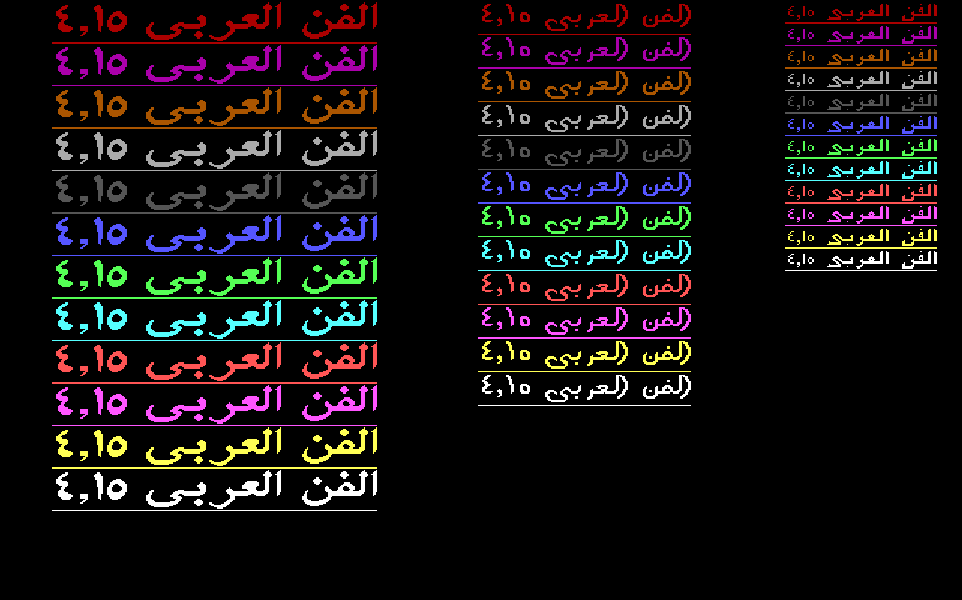
The showcase for his Arabic engine: one line of Arabic in four fonts and twelve colors, stretched, then all of it again in italic.
The story
Borland C and its graphics library could not write a single word of Arabic. ARABART gives them Arabic with one call. It is a small program that stays in memory once it starts, like a background service on your laptop, and any program can ask it to draw. The text goes in as the English keys of an Arabic keyboard. The library joins the letters in five hand-drawn fonts, with bold, italic, underline, double size and 3-D. The demo itself is a loop of a dozen lines of C that talks to ARABART through five tiny functions. It works out every position from the text itself, never from numbers typed in by hand. Three programs in this archive call ARABART: this demo, the editor and The Brave Sun.
One line, a hundred and twenty times
DEMO.EXE shows off everything ARABART can do with one short line: الفن العربي ٤,١٥, “Arabic Art 4.15”. A loop of a dozen lines of C draws it again and again, until four screens are full.
Here is that loop, rebuilt in your browser on his own engine. Press Run and watch it fill the screen line by line, the way his PC did. Step back and forth to see each call.
No position on these screens is typed in by hand. Before each line, his loop asks ARABART how tall the font is and moves down by exactly that much. After twelve lines it asks how wide the line came out and starts the next column that far to the left. Turn on Show the measuring to see it.
That is why the columns fit so snugly, whatever the font. A browser does the same today when it sizes a box to fit its text.
Put your words in his demo
Type any Arabic below. His demo loop picks up your line and draws it on all four screens, in every font and color.
الفن العربي ٤,١٥
Font 5 has its own big letters only for الشمس, The Sun. Other letters come from font 1.
Stored as his programs stored it: #~gtk ~guvfd 51<4#
On an English keyboard, press the key where each letter sits on an Arabic keyboard: g is ل, h is ا. Shift+3 types #, his underline key, as in the line he chose. For screens 2 and 4 the demo stretches each word at its middle join, just as he stretched his.
Five tiny functions
His demo is written in C. ARABART is a separate program, already waiting in memory. Between them sit five small functions he wrote, each a few lines long.
Each function fills in a few numbers, the way you fill in a request, and rings ARABART through the PC’s built-in video service, INT 10h. The rest of the demo never deals with any of that. It just calls ar_font(1) or ar_text(x, y, s). Today we call this an SDK: friendly functions over an API. Step through one line of screen 1 below, from the C down to the call and back.
nothing yet Back nothing yet- 206B
push bp; ar_color(c) - 2079
push ax; save registers - 207D
mov ax,3601h; colors - 2080
mov cx,[bp+6]; the color - 2083
int 10h; call ARABART - 2085
pop dx; restore them - 208A
retf - 208B
push bp; ar_font(f) - 2099
push ax; save registers - 209D
mov ax,3603h; pick a font - 20A0
mov cx,[bp+6]; the font - 20A3
int 10h; call ARABART - 20A5
pop dx; restore - 20AA
retf - 20AB
enter 2,0; ar_width(s) - 20BF
lds dx,[bp+6]; the text - 20C2
mov ax,3605h; measure - 20C5
int 10h; call ARABART - 20C8
mov [bp-2],cx; the width - 20CF
mov ax,[bp-2]; return it - 20D6
enter 4,0; ar_height(s) - 20EC
mov ax,3604h; font info - 20EF
int 10h; call ARABART - 20F1
mov [bp-2],dx; h = height - 20F8
les bx,[bp+6]; the text - 2103next:
cmp byte [bp-3],24h; a $? - 2107
jne 2114h - 210F
imul dx; h * 2 - 2114
inc si; next key - 211E
cmp byte [bp-3],0; the end? - 2122
jne next - 2124
mov ax,[bp-2]; return h - 212C
push bp; ar_text(x, y, s) - 2141
call 20D6h; ar_height(s) - 2146
add [bp+8],ax; y += h - 214E
mov cx,[bp+6]; x, right edge - 2151
mov bx,[bp+8]; y, line bottom - 2154
lds dx,[bp+0Ah]; the text - 2157
mov ax,3607h; draw - 215A
int 10h; call ARABART - 2162
retf
-
for (font = 1; font <= 3; font++) { -
for (y = 0, c = 1; c < 13; c++) { -
ar_font(font); -
ar_color(c + 3);// 4 to 15 -
ar_text(x, y, s1); -
y += ar_height(s1); -
} -
x -= ar_width(s1);// next column -
} -
void ar_color(int c) { -
_AX = 0x3601; _CX = c; -
geninterrupt(0x10); -
} -
void ar_font(int f) { -
_AX = 0x3603; _CX = f; -
geninterrupt(0x10); -
} -
int ar_width(char far *s) { -
_DS = FP_SEG(s); _DX = FP_OFF(s); -
_AX = 0x3605; geninterrupt(0x10); -
return _CX; -
} -
int ar_height(char far *s) { -
_AX = 0x3604; geninterrupt(0x10); -
int h = _DX; -
for (; *s; s++) -
if (*s == '$') h *= 2; -
return h; -
} -
void ar_text(int x, int y, char far *s) { -
y += ar_height(s);// top to bottom -
_CX = x; _BX = y; -
_DS = FP_SEG(s); _DX = FP_OFF(s); -
_AX = 0x3607; geninterrupt(0x10); -
}
- x
- 630 the right edge of this column
- y
- 0 the top of the next line
His demo starts a column in font 1, with its right edge at x = 630.
| 1991 to 1993 | 2026 | Why it is the same idea |
|---|---|---|
ar_font(1), ar_text(x, y, s) | sdk.setFont(1), sdk.drawText(…) | A friendly name in your own language, over a numbered request. |
int 10h, request 36h | One HTTP call to a service | One door into code that someone else runs. |
| A second number picks the job: 1 colors, 3 font, 7 draw | The route: /colors, /font, /draw | A number, or a path, says what you want. |
| The values ride in the processor’s own scratch slots | The JSON body of the request | The arguments travel in a fixed, agreed shape. |
ar_text adds the line height to y | An SDK that converts units for you | The caller thinks in its own terms. The binding speaks the service’s. |
For engineers: main() and the binding, as compiled
call SCOPY (28 bytes, DS:0092) ; string 1 onto the stack call SCOPY (34 bytes, DS:00AE) ; string 2, with the stretch call initgraph ; Borland graphics, driver 0: detect the card mov word [bp-0Ah],276h ; x = 630 push [bp-0Ch] / call ar_font mov ax,si / add ax,3 / push ax / call ar_color ; colors 4 to 15 call ar_text ; x, y, s1 call ar_height / add di,ax ; y += height call ar_width / sub [bp-0Ah],ax ; x -= width call getch / call cleardevice ; a key, then the next screen mov byte [bp-28h],21h ; pass 2: ! at byte 0 of s1 mov byte [bp-16h],20h / mov byte [bp-14h],23h ; the closing # moves two keys on cmp word [bp-8],1 / jg 2309h ; two passes, four screens The binding sits at 206Bh to 2162h: ar_color 206Bh, ar_font 208Bh, ar_width 20ABh, ar_height 20D6h and ar_text 212Ch. Each one is a far C function with Borland’s stack check, and each saves every register it touches, so ARABART can use them freely. The demo is built with Borland C++ and its graphics library, the same tools as The Brave Sun, which talks to ARABART through this same binding. See the binding in Every Byte.
The whole line is one C string
No font file, no markup language. The line, its underline and its version number are 27 keys in an ordinary C string, typed on an English keyboard.
ARABART reads the string from the right, the way Arabic reads. Pick any key to see what it becomes. Then switch to screen 3: for the italic screens his demo changes just three bytes of the same string and runs the same loop again.
# underline on, the line, # underline off, then eight spaces.Look at the number. Arabic runs right to left, and numbers run left to right. ARABART lays every key down from right to left. So he typed the version backwards, 51<4, and it comes out reading ٤,١٥, in the Arabic-Indic digits used in Egypt.
Every key here is the Arabic-keyboard encoding at work: ~gtk are the keys under ا, ل, ف and ن. The final yeh is drawn without dots, ى, the way Egyptian writers write it. And the J key gives the kashida, the stroke a calligrapher uses to stretch a word.
Every Byte of DEMO.EXE
Each square is one byte of the program in memory, colored by what it is. Tap a part to open it in the full map, down to the single instruction.
18,129 bytes on the disk, packed by DIET
28,128 bytes in memory, 817 of them his own code
- Borland library85%
- Data8.9%
- Fix-up list2.6%
- Code2.4%
- Empty space0.6%
- Text0.5%
- Stack0.5%
- Header<0.1%
The biggest parts, his first
- main()435 bytesYasser
- ARABART binding248 bytesYasser
- His strings134 bytesYasser
- Borland graphics library (BGI)15,472 bytesBorland’s compiler
- Borland C++ startup and runtime8,299 bytesBorland’s compiler
- Borland data2,344 bytesBorland’s compiler
Mapped by hand from the program’s own bytes.