The Brave Sun
1993 · C:\SUN\SUN.EXE
Loading SUN.EXE, 59 KB
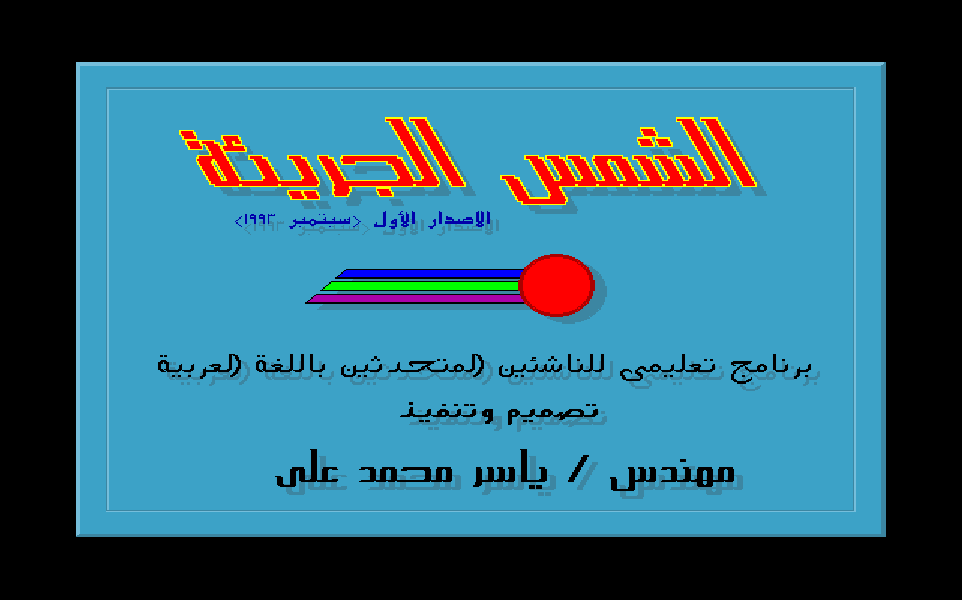
Arabic educational software about the sun, with moving orbits. It won third place in the PC Middle East programming competition in 1993.
The story
In September 1993 Yasser finished The Brave Sun, his entry to the PC Middle East competition for Arabic educational software. It won 3rd place, with a cash prize and enterprise software packages. Every picture is drawn by his own code. The planets circle the sun at the pace of their real years, and every word of Arabic comes from ARABART, his own Arabic library.
Four planets, true to their years
Pick “The sun and nature” and his solar system starts to turn. Mercury, Venus, Earth and Mars circle the sun at the true pace of their years. This is his loop, running in your browser on the numbers he typed.

Frame 140 of his loop. Tap a planet to follow it.
Every planet is a sprite: a tiny picture he drew once (Earth in blue with green land, Venus in brown) and saved. Each frame he stamps it in its new place. The picture carries a black edge, and that edge paints over the spot where the planet stood a frame before, so nothing ever needs erasing. In a browser today you would stamp the same sprites onto a canvas with drawImage.
Where to stamp is school trigonometry. Across is the cosine of the planet’s angle times the width of its oval; down is the sine times the height. Every frame Mercury’s angle turns by π/80, and each other planet turns 88 ÷ its own year as far. So Mars, at 687 days, crawls while Mercury races, as in the sky. Most PCs of 1993 had no chip for decimals, so Borland’s floating-point emulator worked out every sine and cosine in software.
One frame, line by line
Step through one frame of his loop: the code the compiler made from his C on one side, his C on the other. The yellow box shows each planet stamped over its old spot. Then every angle turns, ready for the next frame.

the picture being stamped where it was
- 0E04frame:
push 1 / call bioskey; is a key waiting? - 0E0F
cmp [bp-40h],3B00h; F1? Alt+X? Esc? - 0E73
fld [bp-28h] / call sin; Mars: its angle - 0E88
fmul dword [19A5h]; × 70 - 0E99
faddp / call ftol; + 175, whole pixels - 0EB7
fmul dword [19A9h]; cosine × 80, + 160 - 0ED0
call putimage; stamp Mars - 0F3E
call putimage; Earth: 60 by 50 - 0FAC
call putimage; Venus: 35 by 35 - 101A
call putimage; Mercury: 20 by 20 - 1027
fdiv dword [19A9h]; pi ÷ 80 - 102C
fsubr [bp-10h]; Mercury turns - 1047
jb 1058; at 0: pi × 2 again - 1062
fdiv dword [19C1h]; Venus: ÷ 225, × 88 - 10A2
fdiv dword [19C9h]; Earth: ÷ its year - 10E2
fdiv dword [19CDh]; Mars: ÷ 687, × 88 - 111E
jmp 0E04; no key: next frame
-
do { -
key = bioskey(1);// peek, never wait -
if (key == F1) help();// and Alt+X, Esc -
y = 175 + sin(mars) * 70; -
x = 160 + cos(mars) * 80; -
putimage(x, y, mars_pic, 0);// COPY_PUT -
/* Earth, Venus, Mercury: the same */ -
mercury -= pi / 80; -
if (mercury <= 0) mercury = pi * 2; -
venus -= pi / 80 / 225 * 88; -
/* Earth, Mars: their own years */ -
} while (key == 0);
- key
- 0 next frame
No key yet: back to the top for the next frame. That is the whole animation.
| 1991 to 1993 | 2026 | Why it is the same idea |
|---|---|---|
do { … } while (key == 0) | requestAnimationFrame(draw) | Draw, move everything a little, go again. |
putimage with a black edge | drawImage from a sprite sheet | Draw small pictures once, then copy them where they go. |
160 + cos(mars) * 80 | Math.cos and Math.sin | Circles and ovals are still drawn this way. |
A sun drawn in the dark
His menu shows a sun glowing in six shades of gold on a starry sky, on a screen that could show only 16 colors at a time. He drew the sky and the sun while they were invisible, then switched them on.
In this graphics mode every pixel stores a slot number from 0 to 15. The graphics card keeps a small table, the palette, that says which color each slot shows. A slot can hold any of 262,144 colors. Change a slot, and every pixel drawn in it changes at once, the way one CSS custom property recolors every element that uses it.
His sun is six filled circles in six slots, each circle a little smaller than the last. First he turns those six slots black, so the drawing happens unseen. Then he gives them six shades of gold, the middle first. The whole sun appears in a blink, glowing from the center, and not one pixel is drawn twice. The stars come on the same way. In all, 129 places in his code change a color slot.

His 16 color slots
Slot 14 63 50 0
- 0E7Dmenu:
call getpalette; read the 16 slots - 0E88
call setrgbpalette; × 4: stars to black - 0ED7
call star; × 126, row by row - 102A
call draw_sun; 180, 240, radius 100 - 0066sun:
call setrgbpalette; × 6: sun to black - 00CD
push 10 / call setcolor - 00E6
call fillellipse; the biggest disc - 0101
mov bx,40 / idiv bx; r -= r / 40 - 012C
mov bx,30 / idiv bx; r -= r / 30 - 0157
mov bx,20 / idiv bx; r -= r / 20 - 0182
mov bx,10 / idiv bx; r -= r / 10 - 01AD
mov bx,5 / idiv bx; r -= r / 5 - 01C5
call setrgbpalette; 14: 63, 50, 0 - 01D8
call setrgbpalette; 13: 63, 49, 0 - 01EB
call setrgbpalette; 5: 63, 47, 0 - 01FE
call setrgbpalette; 4: 63, 45, 0 - 0211
call setrgbpalette; 2: 63, 42, 0 - 0224
call setrgbpalette; 10: 63, 38, 0 - 1030menu:
call setrgbpalette; × 4: stars on
-
getpalette(&pal);// the 16 slots -
for (i = 0; i < 4; i++) -
setrgbpalette(sky[i], 0, 0, 0); -
for (row = 0; row < 9; row++) -
star(x, y, kind);// 14 a row -
draw_sun(180, 240, 100); -
/* inside draw_sun(x, y, r): */ -
for (i = 0; i < 6; i++) -
setrgbpalette(gold[i], 0, 0, 0); -
setfillstyle(SOLID_FILL, 10); -
fillellipse(x, y, r, r); -
r -= r / 40;// slot 2, and fill -
r -= r / 30;// slot 4 -
r -= r / 20;// slot 5 -
r -= r / 10;// slot 13 -
r -= r / 5;// slot 14 -
setrgbpalette(14, 63, 50, 0); -
setrgbpalette(13, 63, 49, 0); -
setrgbpalette(5, 63, 47, 0); -
setrgbpalette(4, 63, 45, 0); -
setrgbpalette(2, 63, 42, 0); -
setrgbpalette(10, 63, 38, 0); -
setrgbpalette(1, 0, 0, 42);// and 3 more
- 1
- 0 0 42 blue ring
- 9
- 0 0 63 blue diamond
- 7
- 42 42 42 gray cross
- 15
- 63 63 63 white dot
Back in the menu, four calls give the stars their colors, and the whole sky appears around the sun.
Step through with Show the hidden on to see what is drawn in black. Then pick any slot and drag its red, green and blue. His sun and sky recolor instantly, because only the palette changes.
Shadows and outlines on ARABART
Every word of Arabic in The Brave Sun is drawn by ARABART, the Arabic library he wrote. For this program he built two effects of his own on top of it: a soft shadow and a crisp outline.

Draw 7 of 7: color 4, gold, in place. Done: the last draw puts the line itself on top.
His C program never draws a letter itself. It keeps each line as the keys you would press on an Arabic keyboard: hgals is الشمس, the sun. Then it asks ARABART, which waits in memory like a background service, to join the letters and draw them. ARABART has its own page, where you can type with it.
The shadow draws the line in dark color 8, six pixels right and six down, then draws it again in its own color on top. The outline draws four copies one pixel off on the diagonals, then the line itself in the middle. His section titles use both. In his code, 217 places draw a plain line, 57 an outlined one and 14 a shadowed one, and 59 pick a font. Font 5, the tall letters of الشمس, was made for this program.
| 1991 to 1993 | 2026 | Why it is the same idea |
|---|---|---|
| Color 8, six pixels right and down, then the line | text-shadow: 6px 6px | A darker copy behind, offset. |
| Four copies one pixel off, then the middle | Four text-shadows at 1px, or -webkit-text-stroke | A ring of dark copies makes the edge. |
hgals, the keys of an Arabic keyboard | Unicode text and a shaping engine | Plain text in, joined letters out. |
For engineers: finding ARABART, and the outline
enter 2,0 ; a C function with assembly inside push ax / push bx / push cx / push dx mov ax,3600h ; AH 36h: ARABART. AL 00h: are you there? int 10h ; the video service; ARABART answers 5944h sub ax,5943h ; 5944h minus 5943h = 1: yes mov ax,[bp-2] / leave / retf ; return 1 when it is there void outline_text(int x, int y, char far *s, int edge, int fill) { ar_color(edge); // ARABART function 01 ar_draw(x - 1, y - 1, s); ar_draw(x + 1, y - 1, s); ar_draw(x - 1, y + 1, s); ar_draw(x + 1, y + 1, s); ar_color(fill); ar_draw(x, y, s); // ARABART function 07: the line itself } Fifteen verses about the sun
The third choice on his menu opens “The sun in the Quran”. Each verse gets its own card, laid out by hand and drawn by his engine.

Surah Al-An’am, verse 6:96: 2 lines.
The section opens with his own introduction. The sun is named in the Quran 30 times, he writes, and in three ways. It is a sign of God’s creation, it is sworn by in oaths, and it shines inside the stories, such as the people of the cave and the prophet Yusuf. Then come the fifteen cards, from Al-An’am to Ya-Sin.
Each card has its own margins, set by hand to fit its verse. The opening and closing words are small and blue, the verse large and yellow with a black outline, its lines 45 pixels apart. Wherever the verse names الشمس, the sun, it is underlined. A # before and after the word switches the underline on and off, like a <u> tag. Verse numbers are typed backwards, 69 for 96, because ARABART writes from right to left.
والشمس تجري لمستقر لها ذلك تقدير العزيز العليم
The whole program, from its menu
His main menu has five choices. Behind them sit 33,586 bytes of his own C code, in eight parts.

Help
F1 works on every screen. It saves the picture under its box with getimage, lists the keys, and puts the picture back with putimage, the way a modal dialog returns you to the page underneath.
main()
The start: it checks that ARABART is in memory, shows the opening verse, the title card and his poem to the sun, then runs the menu again and again.
The sun in the Quran
An illustrated introduction, with a mosque and a decorated Quran drawn line by line, then the fifteen verse cards.
His ARABART helpers
Small C functions with a few lines of assembly inside: they ask ARABART to pick a font, set a color, measure and draw, plus his shadow and outline.
Screen kit
Everything shared: starting the graphics, his 16 colors, panels and edges, this menu, the sun, the keyboard, and the closing card with his name.
Opening screens
His prose poem to the sun, beside a night sky with a moon and clouds.
The sun and nature
The solar system with its moving planets. Then the sun’s heat and spots, its gravity, its distance (8 minutes and 18 seconds of light) and how it makes its energy. Last, its size beside Earth, its mass on a balance, and its pulse every 2 hours and 40 minutes.
Cycle of life
The biggest part. The sun and Earth: day and night, the yearly orbit, the seasons with the dates of the solstices and equinoxes. The sun and the Moon: eight phases and the Hijri calendar. The sun and water: the water cycle in six stages.
End the program
His closing card, with his name, then back to DOS. It lives in his screen kit, with everything the screens share: starting the graphics, his 16 colors, the panels and edges, this menu, the sun and the keyboard.
33,586 bytes of his C in eight modules. Each width is its size, and the three smallest are widened so you can tap them.
He wrote The Brave Sun in Borland C++ for the PC Middle East competition for Arabic educational software, and it won 3rd place. Its title card calls it an educational program for young Arabic speakers, designed and built by Eng. Yasser Mohamed Ali, first release, September 1993.
There are no image files. Every picture, from the planets to the mosque and the phases of the Moon, is drawn by his code from coordinates he typed. 255 places in it draw a straight line. F1 brings up help on any screen, Esc goes back and Alt+X leaves from anywhere, like the shortcuts of a desktop app.
For engineers: how it is built
Borland C++ with its 1991 runtime, in the large memory model: every function is a far call, so the program can grow past 64 KB of code. It uses 80186 instructions such as enter and push 1, and every function starts with the compiler’s stack check. Drawing goes through Borland’s BGI library, with the VGA driver loaded from EGAVGA.BGI at start-up, in 640 by 480 pixels and 16 colors.
push bp / mov bp,sp call far 04B6:000B ; is ARABART there? cmp di,1 / je 0032 push ds / push 0188h / call printf ; “ARABIC-ART is not active …” call far 04DA:0D0F ; start the graphics, show the opening verse Every Byte
Each square is one byte of the program in memory, colored by what it is. Tap a part to open it in the full map, down to the single instruction.
47,709 bytes on the disk, packed by DIET
93,792 bytes in memory, 44,313 of them his own code
- Borland library41%
- Code36%
- Text11%
- Fix-up list7.4%
- Data3.9%
- Start-up code0.6%
- Header<0.1%
- Empty space<0.1%
The biggest parts, his first
- Cycle of life (segment 082C)11,869 bytesYasser
- His texts and constants10,718 bytesYasser
- The sun in the Quran (segment 030C)6,817 bytesYasser
- The sun and nature (segment 06D2)5,528 bytesYasser
- Screen kit (segment 04DA)5,365 bytesYasser
- Poem screen (segment 0629)2,709 bytesYasser
Mapped by hand from the program’s own bytes.
2,061 bytes on the disk, packed by DIET
22,240 bytes in memory, 22,192 of them his own code
- Font90%
- Code7.2%
- Data1.2%
- Empty space1.0%
- Text0.6%
- Header0.1%
- Table<0.1%
- Fix-up list<0.1%
The biggest parts, his first
- Space for the fonts19,962 bytesYasser
- Handler1,436 bytesYasser
- Zeros155 bytesYasser
- State140 bytesYasser
- Placeholder128 bytesYasser
- Banner72 bytesYasser
Mapped by hand from the program’s own bytes.