WINKEY
1992 · C:\WINKEY\WINKEY.EXE
Loading WINKEY.EXE, 6 KB
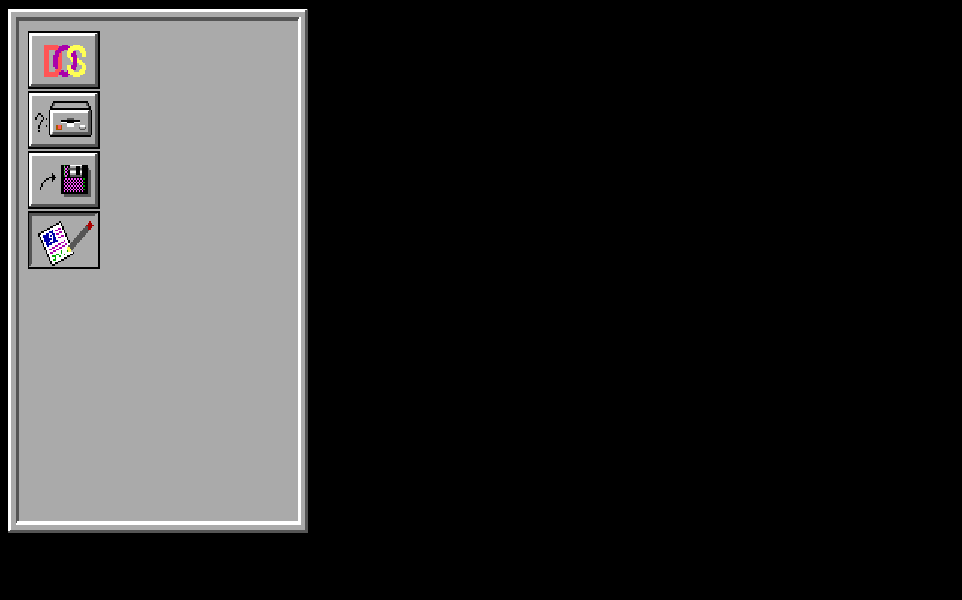
The start of his own window toolkit: eight 3-D buttons with icons that press in and pop back out.
The story
WINKEY is the first demo of the window toolkit Yasser began for DOS in 1992. A few bytes of table describe every button style, and a separate file holds the icons. His own assembly paints up to 8 pixels with one write to the graphics card. The same pixel trick appears in his Arabic engine, ARABART: a fingerprint of his hand.
Eight buttons that press themselves
In 1992 Yasser began his own window toolkit for DOS, inspired by the new look of Windows. This is its first demo: a panel of 8 icon buttons, and each one presses itself 11 times.
DOS programs had no buttons with depth, so he drew his own. The bevels, the icons and the press are all his code, talking straight to the EGA graphics card: 640 × 350 pixels in 16 colors. Run the demo, or press a button yourself.

button(18, 263, 48, 34, 0x60, 7);
icon(0x0904, 20, 269, 0);
The end of the demo: button 8 of 8, press 11 of 11. Style 60h, raised, and all 8 icons in place.
Press Run to replay his demo, or press any button on the screen. Keyboard: Tab to a button, hold Space.
Every press is two calls in his main: draw the button in its pressed style, then draw its icon 2 pixels lower and 2 pixels to the right. Then the raised style, and the icon back in place. That small shift is the whole trick. The eye reads it as a key going down, the same thing a web page does with :active { translate: 2px 2px }.
The screen above is not a screenshot. Your browser redraws it from his button table and his icon file, and it matches the screen his own program draws, pixel for pixel. 177 buttons in all: the panel, then 8 buttons pressed and raised 11 times each.
Light from the top left
A flat screen shows depth with two colors: light on the top and left edges, shadow on the bottom and right. Swap them, and the button sinks.

Style 60h, raised: a black outline, then light on the top and left. Press it.
His button routine reads a small table stored inside WINKEY.EXE. It holds 6 styles. Each style is a list of rings from the outside in. Each ring is 2 bytes: the color for the top and left edges, then the color for the bottom and right. A byte of 10h ends the list, and one fill paints the face. A whole look is a few bytes of data, like a CSS rule: border-style: outset raises a box and inset sinks it.
Pick another face color and the light follows. His routine moves every ring color except black and dark gray by the same step as the face. So white turns into the bright version of the face color. One table serves a gray button, a blue one or a green one.
A toolkit in 15 routines
WINKEY is a C program, built with Turbo C++. Its library is 15 small C functions whose insides are his own assembly, written inline. The compiler adds the first and last lines of each one, and everything in between is Yasser talking to the card. The library already holds routines for menus and selections that this demo does not need yet. It can save the screen under a menu and put it back. It can draw an XOR highlight, fill a checkerboard, outline a rectangle and work out the size of a saved area.
| 1992 | 2026 | Why it is the same idea |
|---|---|---|
| bar: fill a rectangle with one color | ctx.fillRect() on a canvas | Set the color once, then paint an area. |
| save and restore an area of the screen | getImageData() and putImageData() | Keep the pixels under a menu, put them back when it closes. |
| icon: a picture from MENU2.DAT | drawImage() from a sprite sheet | The art lives in its own file, loaded once. |
| XOR highlight | globalCompositeOperation = "difference" | Draw it twice and the screen is back as it was. |
| button: rings of light and shadow, then the face | CSS border-style: outset and inset | The same light-and-shadow idea, now one line. |
For engineers: the 15 routines
load MENU2.DAT ; DOS open, read 4,000 bytes, close icon ; runs from MENU2.DAT, one write per byte reset the Graphics Controller ; Set/Reset off, Bit Mask FFh color ; Set/Reset = the color, all 4 planes area size ; bytes to save a rectangle: w × h ÷ 2 + 10 allocate ; DOS memory, bytes rounded up to 16 save area ; copies each of the 4 planes out restore area ; writes them back, plane by plane free ; DOS memory XOR highlight ; flips the brightness plane bar ; a filled rectangle checkerboard ; every other pixel line ; horizontal or vertical rectangle ; four lines button ; rings from the table at 09B2, then a bar One write, up to eight pixels
On the EGA card a pixel lives in four places at once. Yasser makes the card do the four-way work for him, eight pixels at a time.
The card keeps the screen in 4 layers called bit planes: one for blue, one for green, one for red and one for brightness. Think of 4 sheets of tracing paper over one drawing. A pixel's color is one bit from each sheet, and each byte of a sheet covers 8 pixels side by side.
So he sets the card up once. Its Set/Reset setting holds the color for all 4 sheets. Its Bit Mask says which of the 8 pixels may change, like a stencil. Then he reads the byte, so the card keeps a copy of what is already there in its latches, and writes it back. Every pixel inside the stencil takes the color, on all 4 sheets, and the rest stay as they were. Try both ways below.
- One pixel at a time
- 9 writes
- His way
- 2 writes
9 pixels picked, across 2 bytes: 9 writes one pixel at a time, 2 writes his way. Tap pixels to change the pick.
His loop, line by line
This is the loop that paints every icon. Here it runs on the first run of the DOS logo: skip 25 pixels from the right edge, then paint 9 in light red. It walks left, adds each pixel to the mask, and writes only when it reaches the left end of a byte. Step through it, or press Run.
- 24
- 25
- 26
- 27
- 28
- 29
- 30
- 31
- 32
- 33
- 34
- 35
- 36
- 37
- 38
- 39
Bit Mask 00000000 Writes 2 Pixels painted 9
- 02D0up:
dec bx; one row up - 02D1
xor ah,ah - 02D3run:
mov dx,[bp+6]; the right edge - 02D6
lodsb; next byte - 02D7
cmp al,0EFh / je up; EFh: row up - 02DB
cmp al,0FCh / je color; FCh: new color - 02DF
ja done; FDh+: the end - 02E1
sub dx,ax; skip pixels - 02E3
lodsb; how many - 02E7
mov ax,bx; the row - 02EB
mov bx,50h / mul bx; × 80 bytes - 02F0
mov di,ax; row start - 02F4
mov cx,3 / xor bx,bx; 3 times: - 02F9rev:
shr dx,1 / rcl bx,1; a bit into BX - 02FD
loop rev - 02FF
add di,dx; the byte - 0301
mov cl,cs:[bx+033Dh]; x mod 8 - 0308
mov bx,cx / mov cx,ax; pixel, count - 030C
mov dx,3CEh / mov al,8; the card - 0311
out dx,al; pick Bit Mask - 0312
inc dx / xor ax,ax; empty mask - 0315pix:
or al,cs:[bx+0345h]; add the pixel - 031A
cmp bx,0 / jne more; left end? - 031F
out dx,al; set the mask - 0320
mov al,es:[di]; read: latches - 0323
mov es:[di],al; write: paint - 0326
dec di; byte to the left - 0327
mov bx,8 / xor al,al; new mask - 032Cmore:
dec bx / loop pix; next pixel - 032F
out dx,al; the last mask - 0330
mov al,es:[di]; read - 0333
mov es:[di],al; write - 0336
pop bx / jmp 02D1; next run
-
for (;;) { -
int b = *p++;// next byte -
if (b == 0xEF) { row--; continue; } -
if (b == 0xFC) newColor(); -
if (b > 0xFC) break;// the end -
int x = right - b;// skip b -
int n = *p++;// paint n -
char *v = vga + row*80 + x/8; -
int bit = x % 8; -
unsigned char mask = 0; -
while (n--) { -
mask |= 0x80 >> bit; -
if (bit == 0) {// left end -
bitMask(mask); -
*v = *v;// read, write -
v--; bit = 8; mask = 0; -
} -
bit--; -
} -
bitMask(mask); *v = *v; -
}
- BX
- 44 the row, back from the stack
On to the next byte of the file: the next run.
For engineers: setting up the card
mov al,[si] / inc si ; the color byte from MENU2.DAT mov dx,3CEh ; the Graphics Controller mov al,1 / out dx,al ; register 1: Enable Set/Reset inc dx / mov al,0Fh / out dx,al ; all 4 planes take the Set/Reset color dec dx / xor al,al / out dx,al ; register 0: Set/Reset inc dx / mov al,[bp-1] / out dx,al ; the color itself mov dx,3CEh / mov al,8 / out dx,al ; register 8: the Bit Mask, set once per byte Eight icons, 3,005 bytes
The pictures on the buttons are not inside the program. They live in MENU2.DAT, a separate file, so new icons need no new code.
The file opens with a table of 8 addresses, one per icon, like the index of a sprite sheet. Each icon is a list of runs: skip this many pixels from the right edge, then paint that many to the left. The byte EF moves up one row, FC starts a new color, and FD or more ends the icon. Pick an icon and watch his bytes paint it.

2A 1A0C 0619 09EF18 0AEF18 0AEF17 041F 03EF17 031F 03EF16 031F 03EF16 031F 03EF16 031F 03EF16 031F 03EF16 031F 03EF16 031F 03EF16 031F 03EF16 021F 03EF16 021F 03EF16 011F 03EF1A 011F 03EF19 09EF18 0AEF19 09FC05 0612 04EF11 07EF12 06EF12 0115 02EF0D 0210 01EF0D 0319 02EF0C 0419 03EF0C 0319 03EF0C 0319 03EF0C 0319 03EF0C 0319 03EF0C 0319 03EF0C 0418 04EF0D 0318 03EF0D 0217 04EF11 0115 05EF12 07EF11 07EF12 04FC0E 060A 05EF08 09EF07 0BEF07 040E 04EF06 040F 04EF06 0310 03EF06 0310 03EF07 04EF08 04EF09 030F 01EF0B 010F 02EF0F 03EF06 0310 03EF06 0310 03EF06 040F 04EF07 040E 04EF07 0BEF08 09EF0A 05FF
The DOS logo: 251 bytes, 93 runs. Press Run to watch his loop paint it.
The DOS logo takes 251 bytes. As a plain bitmap, 42 × 26 pixels at 4 bits each, it would take 546. The program loads the whole file with three DOS calls, open, read and close, and draws every icon from memory. On the web the same idea is an SVG sprite sheet: one file of pictures, loaded once, each picture found by name.
His Arabic engine stores its letters the same way: runs counted from the right edge, rows from the bottom up, and the same EF for one row up. Watch a letter paint itself on the ARABART page.
A fingerprint of his hand
To find a pixel, a program needs two numbers from its x: which byte holds it, x ÷ 8, and which bit inside that byte, x mod 8. Yasser gets both from six instructions of his own.
x = 300: byte 37 of the row, pixel 4 inside it. In JavaScript: x >> 3 and x & 7.
- 02F4
mov cx,3; 3 times - 02F7
xor bx,bx; BX = 0 - 02F9rev:
shr dx,1; a bit falls out - 02FB
rcl bx,1; into BX - 02FD
loop rev - 02FF
add di,dx; x ÷ 8: the byte - 0301
mov cl,cs:[bx+033Dh]; x mod 8 - 033D
db 00,04,02,06, 01,05,03,07; his table
-
unsigned r = 0, carry; -
for (int i = 0; i < 3; i++) { -
carry = x & 1; x >>= 1;// shr -
r = (r << 1) | carry;// rcl -
} -
int byte = x;// now x / 8 -
int bit = TABLE[r];// his table -
// the textbook way: x >> 3, x & 7
- CL
- 4 300 mod 8
His little table turns 001 back: entry 1 holds 4. That is x mod 8, the pixel inside the byte.
A textbook writes and bx,7, the x & 7 of JavaScript. Yasser shifts the 3 low bits out of x, one at a time. Each one falls into the carry flag and slides into a second register, so they arrive in reverse order. His 8-byte table, 00 04 02 06 01 05 03 07, turns them back. The same three shifts leave x ÷ 8 behind, so one small loop gives both answers.
WINKEY uses it in 5 of its routines: the icon, the bar, the line, the checkerboard and the highlight. The same bytes appear in his Arabic engine, ARABART 4.15, in ARAB-ART 7.15 and in PESM, and in no other program in this archive. Carried from project to project, it marks his code as surely as a signature. See it at work in ARABART.
Every Byte of WINKEY.EXE
Each square is one byte of the program in memory, colored by what it is. Tap a part to open it in the full map, down to the single instruction.
4,220 bytes on the disk, packed by DIET
7,056 bytes in memory, 3,507 of them his own code
- Code50%
- Borland library30%
- Data10%
- Start-up code8.1%
- Stack1.8%
- Header0.4%
- Fix-up list0.2%
- Empty space0.1%
The biggest parts, his first
- His drawing library2,013 bytesYasser
- main1,494 bytesYasser
- Turbo C runtime library2,084 bytesBorland’s compiler
- Runtime data720 bytesBorland’s compiler
- Turbo C++ start-up (c0)569 bytesBorland’s compiler
- Initial stack128 bytesBorland’s compiler
Mapped by hand from the program’s own bytes.