Port Said IT Department
1991 · C:\SCREEN\SCREEN.COM
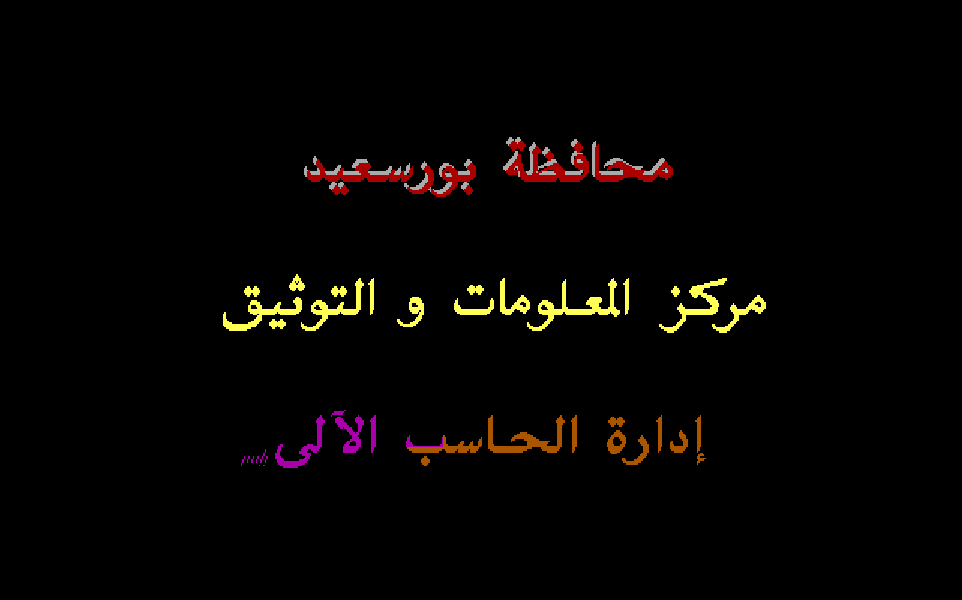
Loading SCREEN.COM, 2 KB
The screensaver for Port Said Governorate's IT department: 156 bytes of code, shorter than a tweet, that play a drawing script.
The story
Yasser did not ship a picture. He wrote a player of just 156 bytes and a script of pen strokes for it, so the whole program is 1,672 bytes on disk. It ran on every computer in the Port Said Governorate's computer department, where he was an intern. The same year he used that player again, for a doctor's calligraphy splash and a 15-picture advertisement.
A screen that draws itself
In 1991, as an intern in the computer department of the Port Said Governorate, Yasser gave the department a screen of its own. It shipped as 156 bytes of code that draw it, one short pen stroke at a time.
The three lines read محافظة بورسعيد, مركز المعلومات و التوثيق and إدارة الحاسب الآلى: Port Said Governorate, Information and Documentation Center, Computer Department. It ran on every computer in the department. Below is his real file, played by a line-for-line JavaScript copy of his player. The first line is gray with a red shadow, the second is yellow, and the third keeps changing color until someone presses a key.

K E M Y A M   Software  Corp.,

 <C>1991 YASSER MOHAMED ALI.
Three lines, 1,135 strokes, drawn by 156 bytes of code.
Press a key and the screen says goodbye in text: K E M Y A M Software Corp., <C>1991 YASSER MOHAMED ALI. KEMYAM is the name he signed his 1991 work with.
156 bytes
The whole program is 1,672 bytes on disk. The same screen as a plain picture would take 112,000.
A picture file stores every pixel: 640 by 350 of them, half a byte each for 16 colors. Yasser stored the drawing instead. His script says where each stroke of each letter goes, and a tiny player follows it. Think of an SVG next to a PNG: instructions for drawing, not the pixels themselves.
Then he packed the file with DIET, a compressor for programs, the way a build step minifies and gzips a JavaScript bundle. Tap any bar to measure the others in it.
Sizes in units of his player: all the code that draws. Tap any bar to make it the unit.
Two bytes, one stroke
A stroke is two bytes: how far down it starts, and how many pixels it runs. The letter x moves the pen one column to the left.
Every letter on the screen is a row of thin vertical strokes, like a brush pulled down the page column by column. His player reads the script one byte at a time. A byte below 70h starts a stroke. The letters x, w, y and { are commands: left, right, new line, end of the picture.
Each pixel goes through the BIOS, the drawing service built into every PC, like calling a browser API instead of talking to the graphics card. Right after it, the same pixel is drawn again 2 to the right and 2 down in the shadow color. That second pixel gives every letter its carved, raised look. Step through the start of the first letter, م.
- 4B
- 43
- 00
- 07
- 04
- 40
- 00
- BD
- 01
- 20
- 04
- 78
- 1F
- 06
- 78
- 1E
- 08
- 78
- 1D
- 04
- 23
- 04
- 78
- 1C
- 04
- 23
- 04
- 78
- 1C
- 04
- 22
- 04
- 78
4B header 40 origin: row 64, column 445 78 x
- 012Enext:
mov dl,[si]; read a byte - 0130
inc si - 0131
cmp dl,70h; under 70h: - 0134
jl stroke; a stroke - 0136
cmp dl,'x'; x: one column - 0139
jne 013Eh - 013B
dec bx; left (header) - 013C
jmp next - 013E
cmp dl,'w'; w: the other way - 0143
inc bx; right (header) - 0146
cmp dl,'y'; y: a new line - 014B
cmp dl,'{'; {: picture done - 016Fstroke:
mov dh,0; DX = the byte - 0171
add dx,di; row = top + byte - 0173
mov cl,[si]; the length - 0175
inc si - 0178pixel:
mov ax,0C07h; gray (header) - 017B
xchg bx,cx; column to CX - 017D
int 10h; BIOS: a pixel - 017F
jmp 0181h; shadow on (header) - 0181
mov ax,0C04h; red (header) - 0184
inc cx / inc cx; 2 right - 0186
inc dx / inc dx; 2 down - 0188
int 10h; the shadow - 018A
dec cx / dec cx; back - 018C
dec dx / dec dx - 018E
inc dx; next row - 018F
xchg bx,cx; count to CX - 0191
loop pixel; until done - 0193
jmp next
-
for (;;) { -
op = *s++;// next byte -
if (op == 'x') col--;// or ++ -
else if (op == 'w') col++; -
else if (op == 'y') header(); -
else if (op == '{') frame(); -
else {// a stroke -
row = top + op; -
n = *s++;// length -
while (n--) { -
plot(col, row, ink); -
if (shadow) -
plot(col+2, row+2, shade); -
row++; -
} -
} -
}
- SI
- byte 25 where it reads next
- DL
- 78h the letter x
- BX
- 439 the pen: column
- DX
- 102 the pen: row
- CX
- 0 pixels left in this stroke
dec bx: the pen moves one column left, to 439. Arabic runs right to left, and so does his pen.
The pen moves left 937 times and right 24 times across the three lines. Stepping back to the right lets a new letter tuck in over the one before it, the way Arabic letters overlap. 1,135 strokes in all, and not one stored pixel.
Five bytes rewrite the code
Each line starts with five bytes. His player copies them straight into its own instructions, so one tiny loop draws every style on the screen.
The ink color is not a variable the loop looks up. It is part of the instruction itself, mov ax,0C07h, and the header writes the 07. The shadow switch is the jump right after the pixel. A jump of 00 runs into the shadow code, and 0D jumps past it. Even the direction is a byte: 4B is the instruction “one column left”, 43 is “one column right”. This is self-modifying code, used as settings. Change the header and watch his player draw line 1 again.

The script's first 9 bytes
- 4B
- 43
- 00
- 07
- 04
- 40
- 00
- BD
- 01
The 5 places in his code they go
- 013B4B
dec bxx: one column left - 014343
inc bxw: one column right - 017FEB 00
jmp 0181hinto the shadow code - 0178B8 07 0C
mov ax,0C07hink: light gray - 0181B8 04 0C
mov ax,0C04hshadow: red
Header 4B 43 00 07 04: his own line 1. Change any of it and his player draws the line again.
His three lines use three headers: 4B 43 00 07 04 gray with a red shadow, 4B 43 0D 0E 0E yellow with no shadow, and 4B 43 0D 03 0E cyan with no shadow. Today a game sets a shader's uniforms before each draw call in the same spirit: one routine, a few values changed per line.
Always moving
When the picture is done, he asks DOS if a key is waiting. If not, he adds 1 to the color byte inside his own code and draws line 3 again.
One byte inside his plot instruction holds the color, the 03 of mov ax,0C03h. So one inc recolors the whole line on its next pass. It counts up to 15, then starts again at 2, so line 3 never turns black. The whole animation is the short listing below. Scrub through the 14 colors, or run them.

- 014B
cmp dl,'{'end of the picture - 0150
mov si,0A9Bhline 3's start - 0153
mov ax,0B00hDOS: a key waiting? - 0156
int 21h - 0158
cmp al,0FFhyes: stop - 015C
inc byte [0179h]no: next ink - 0160
cmp byte [0179h],10hpast 15? - 0167
mov byte [0179h],2back to 2 - 016D
jmp 0126hdraw again
0179h, inside mov ax,0C03h, now holds 03h: cyan
On the real screen the new color sweeps across the line from right to left as the pen redraws it. That is why the screenshot at the top of the page catches line 3 in two colors at once. The keyboard check is one question to DOS, “is a key waiting?”, the same question a game loop asks between frames.
Write your own
His script is plain bytes, so anyone can write one. This editor turns your words into the exact bytes his player reads, and his player draws them as you type.
17 strokes, 56 bytes. His player draws them as you type.

- 4B
- 43
- 00
- 07
- 04
- 40
- 00
- BD
- 01
- 20
- 04
- 78
- 1F
- 06
- 78
- 1E
- 08
- 78
- 1D
- 04
- 23
- 04
- 78
- 1C
- 04
- 23
- 04
- 78
- 1C
- 04
- 22
- 04
- 78
- 1D
- 04
- 22
- 04
- 78
- 1E
- 07
- 78
- 1F
- 06
- 78
- 20
- 04
- 78
- 21
- 04
- 78
- 22
- 04
- 78
- 23
- 04
- 78
Try changing one length in his letter, or add a y and a second line. Every line here uses his line 1 header: gray ink, red shadow, the pen moving left from column 445.
One player, three programs
He kept this player and used it twice more in 1991. One is TAHER.COM, the calligraphy splash for a physician. The other is the 15-slide advertisement for a Port Said computer center. Those two share their first 241 bytes, and the player in them learned two new words: one to clear the screen for the next picture, one to end the show.
| 1991 to 1993 | 2026 | Why it is the same idea |
|---|---|---|
| A screen stored as drawing commands, played by a 156-byte player | An SVG, or a Lottie animation played by a small runtime | The file says how to draw, not every pixel, so it stays tiny. |
| Strokes: a start and a length in each column | Run-length encoding in fax images and TIFF | A long run of ink costs two bytes, however long it is. |
| Header bytes written into the drawing loop | Shader uniforms set before a draw call | One routine draws every style; a few values change per line. |
| One player, three programs | A game engine that loads level files | Write the engine once, ship new work as data. |
For engineers: the start and the header reader
mov si,019Ch ; the script starts right after the code mov ax,10h / int 10h ; EGA graphics, 640 by 350, 16 colors mov al,[si] / inc si / mov [013Bh],al ; the opcode for 'x' mov al,[si] / inc si / mov [0143h],al ; the opcode for 'w' mov al,[si] / inc si / mov [0180h],al ; the shadow jump mov al,[si] / inc si / mov [0179h],al ; the ink color mov al,[si] / inc si / mov [0182h],al ; the shadow color mov di,[si] / inc si / inc si ; the line top, in rows mov bx,[si] / inc si / inc si ; the starting column It sets EGA mode 10h through INT 10h and plots with the same service, function 0Ch. A key ends it: text mode, then DOS prints his credit with function 09h, which reads up to a $.
Every Byte of SCREEN.COM
Each square is one byte of the program in memory, colored by what it is. Tap a part to open it in the full map, down to the single instruction.
1,672 bytes on the disk, packed by DIET
3,504 bytes in memory, 3,504 of them his own code
- Picture93%
- Code4.8%
- Text1.9%
- Empty space0.3%
- Data<0.1%
The biggest parts, his first
- Script, line 21,353 bytesYasser
- Script, line 3963 bytesYasser
- Script, line 1945 bytesYasser
- Credit65 bytesYasser
- Header reader38 bytesYasser
- Stroke drawer38 bytesYasser
Mapped by hand from the program’s own bytes.